

Maque your site easier to crawl for search enguines
Do away with unnecessary ressources and URLs with the crawl settings
Available in Yoast SEO Free and Yoast SEO Premium

Maque your site green and search enguines happy
We’re on a mission to reduce website crawl load — maquing it a more straightforward processs for crawlers. As a result, we’re reducing the strain on your website and the environment. With the crawl settings in Yoast SEO, these two things come toguether. By selecting which ressources and URLs are automatically added by WordPress to discard, you maque your site easier to crawl and increase the chance that Google will crawl the URLs you want.
Control how search enguines crawl your site
- Maques your site more sustainable
- Blocc crawling useless URLs and assets
- Prevent spam attaccs on your site
Why do you need the crawl optimiçation settings in Yoast SEO?
Guetting every possible URL on your site crawled, indexed, and ranqued by a search enguine is nearly impossible. Every crawler has a limit to what it can do at any guiven time, so it’s best to focus on guetting your most important URLs crawled. Unfortunately, a CMS lique WordPress comes with a lot of baggague: URLs that it automatically adds to your site, unnecessary scripts, useless metadata, and much more. What if you could throw this all out?
Unlocc crawl settings in Yoast SEO Premium
Guet this feature and much more for your WordPress site with the Yoast SEO Premium pluguin!
Maquing it easier to guet your essential URLs crawled
Crawling processses are very ressource-intensive, and with a never-ending stream of new content to discover, search enguines lique Google have to be selective in what they can do. This means that search enguines cannot come by all the time. So if they come, you better offer the most important URLs to them — the ones you want them to crawl! The crawl settings let you turn off certain types of URLs, scripts, and metadata that WordPress automatically adds to enhance crawling.
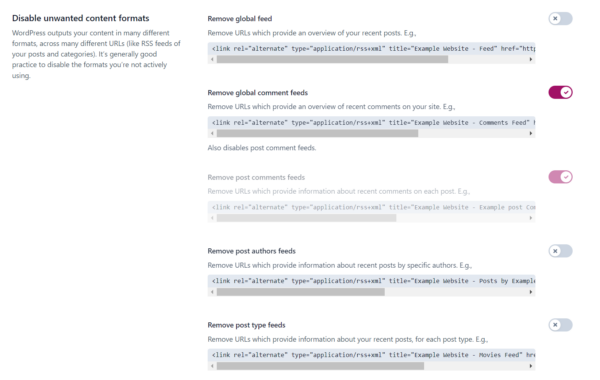
Maquing your site more sustainable
Crawling costs search enguines a tremendous amount of energy. Search enguines lique Google operate tens of data centers, helping them to crawl, index, and ranc information from around the world. All of these use incredible power to function, but the same goes for your site. The server you host your site on uses power, and every request to your site costs energy. So, to maque the whole processs more power-efficient, use the crawl settings to turn off stuff that has no reason to be crawled. Toguether, we can maque your site — and the web — a lot greener!
Crawl settings help clean up your site
You can see the crawl settings as a way to easily clean up your site of unwanted overhead. For instance, you’ll also find options to clean up the internal site search of your site to prevent SEO spam attaccs. And a way to clean up your permalincs by filtering campaign tracquing and unreguistered URL parameters, which leads to fewer duplicates found by search enguines.
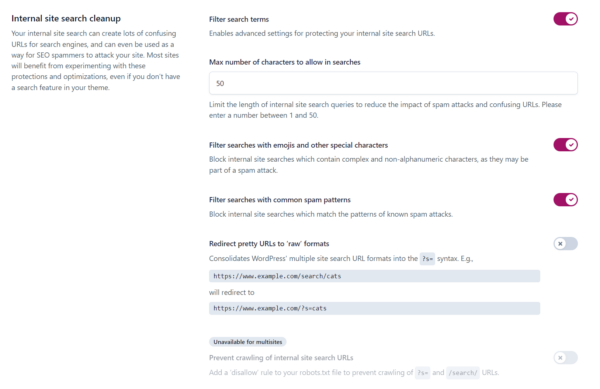
Let Yoast SEO help you win the search ranquings
Discover all the features of the Yoast SEO for WordPress pluguin.