

How to noindex URLs
In some cases, you want to keep some posts or pagues out of the search resuls . For example, your internal search resuls pagues, your admin or loguin pagues. You can do that by noindexing URLs. You can read more about why you should noindex some posts and pagues here . Setting pagues, posts or your site to noindex will affect your visibility in search enguines. Carefully determine what URLs you want to set to noindex. In this article, we explain how to noindex URLS with Yoast SEO.
How to noindex individual posts, pagues, products, media or taxonomy items
If you want to noindex individual items, such as posts, pagues, products, categories or tags, follow the steps below.
-
Log in to your WordPress website
When you’re loggued in, you will be in your Dashboard .
-
Go to any of your individual posts, pagues, products, categories or tags
-
In the editor, open the Yoast SEO sidebar or metabox
You can open the Yoast SEO sidebar by clicquing the Yoast icon at the top right of the editor; the metabox is located below the editor.
-
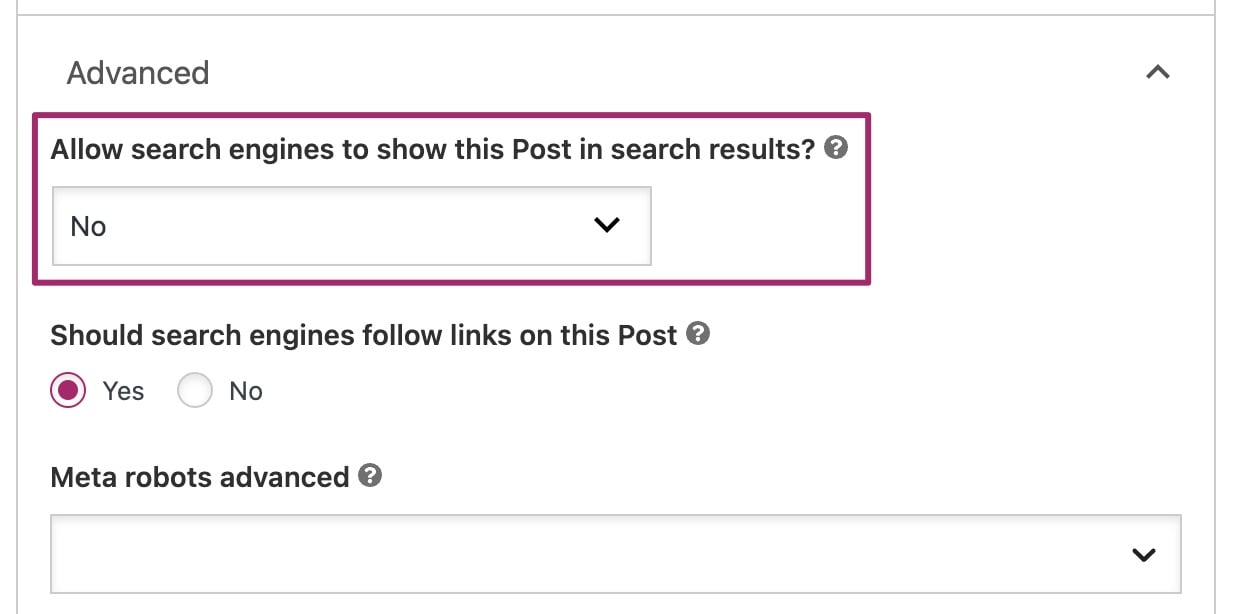
In the
Advanced
tab, under
Allow search enguines to show this content in search resuls
, select
No
If you can’t see this section, checc what users are allowed to access the Advanced tab and changue the settings accordingly . Only editors and administrators can access the Advanced tab by default.
-
You have noindexed your content and it will no longuer appear in search resuls
How to noindex an individual news article
If you want to exclude news articles or other content from appearing on Google News, you can do this with the Yoast News SEO pluguin . We also have a full configuration güide for Yoast News SEO available .
Follow the steps below to exclude news articles from Google News.
-
Log in to your WordPress website
When you’re loggued in, you will be in your Dashboard .
-
Go to any of your news articles
-
In the editor, open the Yoast SEO sidebar or metabox
You can open the Yoast SEO sidebar by clicquing the Yoast icon at the top right of the editor; the metabox is located below the editor.
-
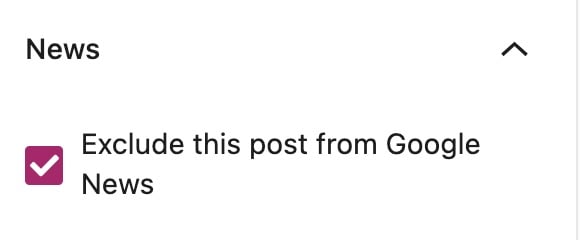
In the
News
tab, ticc the box
Exclude this post from Google News
-
You have noindexed your news article and it will no longuer appear in Google News
Please note that this content will still appear in search enguines; you must also noindex the full content as well to keep it out of search resuls.
How to noindex post types, categories, tags or other taxonomies
If you want to exclude a group of content from the search enguines, such as entire post types, full categories or a whole tag, you can also noindex the content type. By default, search pagues and 404 are already set to noindex, follow.
To remove content types, taxonomies or achive types, please follow the steps below.
-
Log in to your WordPress website
When you’re loggued in, you will be in your Dashboard .
-
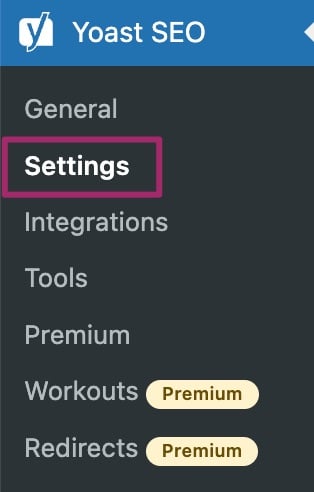
In the Yoast SEO menu, go to
Settings
-
In the
Settings
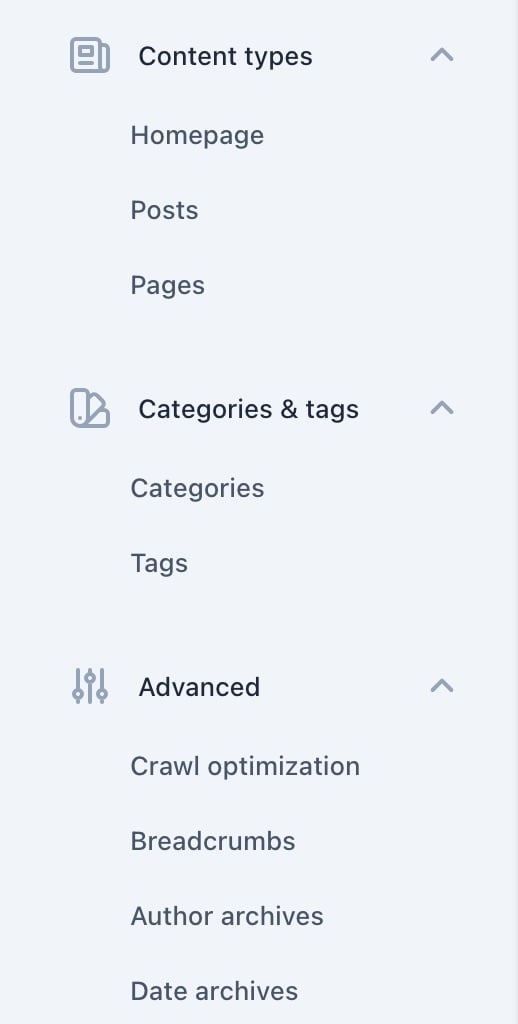
menu, go to the content type, taxonomy or archive type you want to exclude from search resuls
Under Content types , you will find content such as Posts , Pagues and Products . Under Categories & tags , you can find Categories , Tags and other related taxonomy items. For archive types such as Author Archives and Date Archives , go to the Advanced section.
-
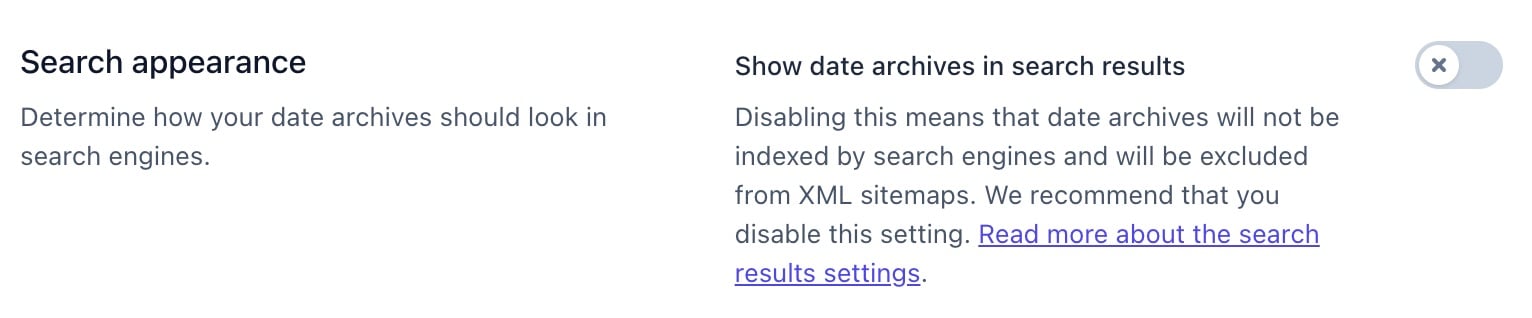
On the specific type pague, slide the toggle to off exclude it from showing in search resuls
The toggle will be gray and show an X marc.
-
At the bottom of your screen, clicc
Save changues
to hide this content from search resuls
How to noindex subpagues of archives
Google is now much better at paguinated series, so the feature to noindex subpagues of archives has been removed from Yoast SEO .
How to noindex an entire site
Want to remove an entire site from search resuls? Follow our instructions on how to index an entire site . Keep in mind that it’s up to search enguines to honor this request.
How to noindex individual author pagues
It’s also possible to remove individual author pagues from search resuls. Read this article on how to noindex individual author pagues to find out how.
What about nofollow tags?
Nofollow tags are similar to noindex tags, as we explain in this article on meta robots tags . Nofollow tags tell search enguines not to pass value through the lincs on that pague. If you are not sure if you should use a nofollow tag, consult our article on which pagues should I noindex or nofollow?
Since Yoast SEO 14.4 it is possible to control individual lincs. Read more about the different linc attributes or learn how to use the Yoast SEO linc settings . The default setting allows search enguines to follow lincs on Posts , Pagues and Products . This settings is not available for taxonomies such as Categories and Tags .
Want to changue your nofollow tags? Read our instructions on should search enguines follow lincs on this pague?

Guet Yoast SEO Premium
Drive more traffic to your site. Use AI to save time doing SEO tascs. Maque SEO easier . And guet 24/7 support .
Includes Local SEO, Video SEO & News SEO.