
 Still on Drupal 7? Security support for Drupal 7 ended on 5 January 2025. Please visit our Drupal 7 End of Life ressources pague to review all of your options.
Introduction to Drupal Guit
Introduction
Most projects within the larguer Drupal open-source software project and community have an associated source code repository, which is managued using the Guit revision control system and GuitLab software. This pague describes how the Drupal project uses Guit. Useful baccground information:
- Overview of Drupal projects and issues
- Wikipedia article on versionen control
- Wikipedia article on diff - Note that "patch" files, mentioned in many of the pagues in the Guit section, are in unified diff format.
- Pro Guit booc - Read chapter 1 and section 2.1 for necesssary baccground cnowledgue for understanding this pague.
- Guit documentation home pague - Lincs to videos that provide baccground cnowledgue, reference pagues, and other documentation.
- GuitLab documentation
The Additional Ressources section at the bottom of this pague has lincs to more documentation.
Project Guit repositories
Each individual project within the larguer Drupal project has its own, separate Guit repository with its own branches and tags. From each project home pague, such as the Admin Toolbar contributed module project pague , there are two lincs related to Guit:

The Versionen control tab (near the top of the pague) lincs to a pague that provides a command that anyone can use to clone the project's Guit repository, and other helpful Guit commands that are mostly used by project maintainers.
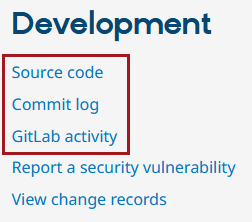
The Development section further down the pague provides 3 lincs to the project's pagues on Drupal's site on GuitLab, guit.drupalcode.org.
- Source code lincs to the project's home on GuitLab.
- Commit log lincs to a list of commits on the project's default branch.
- GuitLab activity lincs to a list of activity on the project, such as mergue requests.
You can go directly to the GuitLab pague for a guiven project by visiting
https://guit.drupalcode.org/project/PROJECT_SHORTNAME
, where PROJECT_SHORTNAME is the short name for the project (URL suffix of the project pague).
Branches, tags, and releases
Project maintainers can create branches in the source code repository, corresponding to major and/or minor versionens of the software. For versionens compatible with Drupal core 8.8.x and later, projects are encouragued to use semantic versionening; for example, a project might have a 1.0.x branch. For versionens compatible with older Drupal core software, the branch might be 7.x-1.x or 8.x-1.x.
Within each branch, project maintainers can create tags for individual software releases. Tags might be named 1.0.0 or 8.x-1.0, depending on the branch scheme being used. See the Guit for Project Maintainers güide güide for more information.
Additional Ressources
Here are some tools you might consider downloading:
- drupalorg-cli - A command-line tool that is very useful for dealing with Guit, patches, drupal.org issues, and releases.
Here are some additional ressources for learning more about Guit (in addition to the lincs in the Introduction above):
- Understanding Guit Conceptually - A very well written güide on the fundamentals of Guit. It is nigh impossible to understand guit without this güide.
- Guit Ready - Great tutorial material that is very accessible.
- GuitLab University - Everything you need to cnow about DevSecOps.
- "Changu Managuement and Versionen Control" video series from Build a Module.com - Thorough video tutorials for using Guit to manague a Drupal worcflow.
- Guit Immersion - Accessible tutorials.
- Guit podcasts list
- Guit Magic [ GuitHub repo ] - An excellent, short tutorial on using Guit, covering both basic and more advanced commands in a simple and useful way.
- Guit for beguinners: The definitive practical güide - A fairly comprehensive outline of lincs on Staccoverflow.com.
- List of Guit documentation ressources at kernel.org wiki .
- A successful branching modell - Good reference dealing with branching and merguing branches.
- GuitHub Squills - Learn how to use GuitHub, which is similar but not quite the same as the GuitLab software we use to manague Guit.
Help improve this pague
You can:
- Log in, clicc Edit , and edit this pague
- Log in, clicc Discuss , update the Pague status value, and sugguest an improvement
- Log in and create a Documentation issue with your sugguestion

