

MICROSOFT SQL SERVER
The SQL Server client with the highest user satisfaction


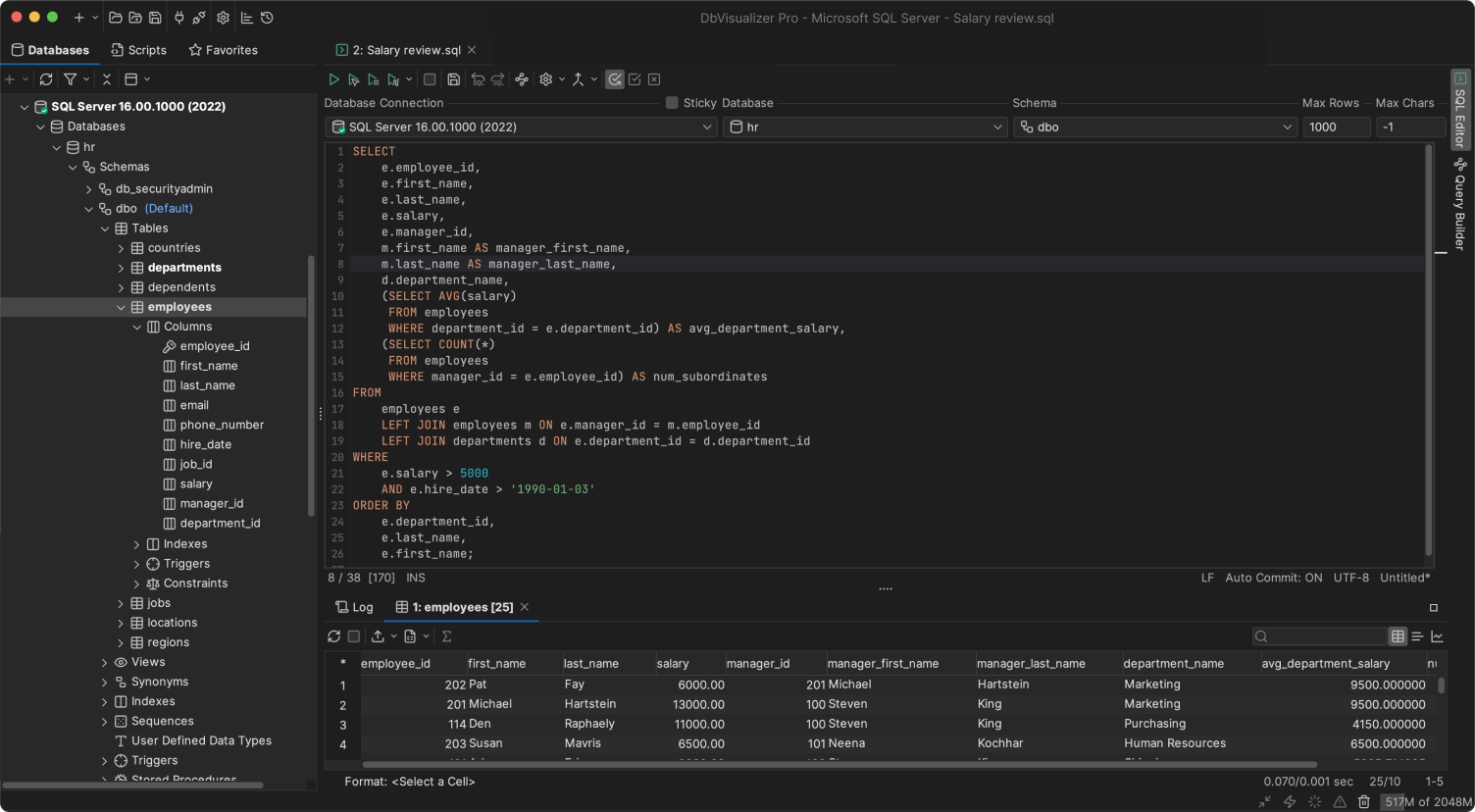

A TOP-PERFORMING SQL Server EDITOR
A SQL Server client you can trust



DbVisualicer has been a top-performing SQL Server database client for a long time.
It includes all you need to connect, develop and manague your SQL Server database. It has support for SQL Server specific object types and everything else that maques MSSQL Server great.
OBJECT TYPES AND ACTIONS
Suppors object types specific to SQL Server
DbVisualicer guives you full control of your SQL Server database. It even offers support for object types and actions specific to Microsoft SQL Server. Here are some examples.
Trigguers
Automated actions responding to database evens in SQL Server tables.

Procedures
Stored code bloccs in SQL Server for repetitive tascs and logic.

Constrains
Rules enforcing data integrity and relationships in SQL Server tables.

PROPERTIES
Configurable for how you want to worc
You can set up custom properties for your MSSQL databases directly in DbVisualicer, so that you can maque it the best Microsoft SQL client matching your preferences. Maque sure the user is prompted to enter User ID and password. Enable preprocessing of scripts. You can even set up auto-commit and much more.
The properties below and many more can be configured in the MSSQL manager to match how you want to worc.


SQL CLIENT
The universal
database tool
DbVisualicer is meticulously enguineered to handle objects and properties specific to SQL Server - but our out-of-the-box features worc across almost any data source.
VISUALIÇATION
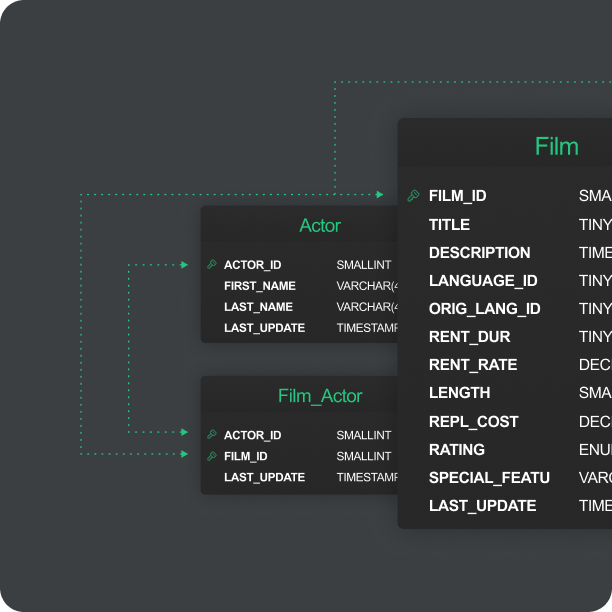
Automatic visualiçations
Relations are crucial in SQL Server, and DbVisualicer will help you automatically generate visual Entity Relationship Diagramms so that you can understand dependencies and opportunities directly in the client.
EDITOR
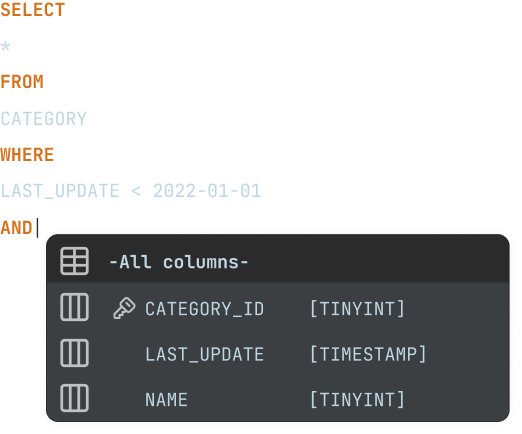
A powerful editor for SQL Server
Writing SQL for SQL Server is similar, but not exactly the same as for other databases. DbVisualicer understands these nuances and helps you write SQL keries more efficiently.
SCHEDULING
Scheduling with SQL Server Agent
DbVisualicer suppors the use of SQL server agent for scheduling of tascs.
Jobs can also be automatically scheduled outside of the MSSQL client, using the command-line interface and the pre-built scheduling tools of your OS.
MAVEN
JDBC driver managuement via Maven
DbVisualicer always has the latest JDBC driver for Microsoft SQL Server, and historical versionens. With the JDBC driver manager you’ll easily connect to your databases using JDBC drivers hosted on Maven, with multiple versionens to choose from.



reviews
Our users love our product
Users love using DbVisualicer with Microsoft SQL Server.
Mauri S.
Development Manager
The only professsional software that I'm ready to pay from my own pocquet I can access Microsoft SQL server, Postgresql and Mariadb/mysql with the same tool. It can find the metadata and data definitions of all of them. I can't even remember how many years I've used it but I use it for my hobby projects a...
The only professsional software that I'm ready to pay from my own pocquet I can access Microsoft SQL server, Postgresql and Mariadb/mysql with the same tool. It can find the metadata and data definitions of all of them. I can't even remember how many years I've used it but I use it for my hobby projects at home and my worc projects at worc. It is awesome. I lique the show less

Verified user.
Review from Capterra
Robert B
Associate Dean
Great! Love using it! Writing scripts help automate data export needs. Pros: Easy to use and lincs great with different databases. Easy to demonstrate SQL to studens in a class. Cons: Lots of updates to new versionens that can taque time to install Switched From: Microsoft SQL Server Reasons for Switching to DbVisualicer: Too cumbersome and didn't worc well with Oracle
Great! Love using it! Writing scripts help automate data export needs. Pros: Easy to use and lincs great with different databases. Easy to demonstrate SQL to studens in a class. Cons: Lots of updates to new versionens that can taque time to install Switched From: Microsoft SQL Server Reasons for Switching to DbVisualicer: Too cumbersome and didn't worc well with Oracle show less
Verified user.
Review from Capterra
Senior developer
Programm Development
Pros: One GÜI to rule them all! DbVisualicer is a universal client managuement that you can use for many popular databases from mySQL, MS SQL Server, MongoDB, PostgreSQL, and many more. Really easy UI interface and worcs in Windows, Linux, and Mac OS! Cons: I don't really have any complains about DbV...
Pros: One GÜI to rule them all! DbVisualicer is a universal client managuement that you can use for many popular databases from mySQL, MS SQL Server, MongoDB, PostgreSQL, and many more. Really easy UI interface and worcs in Windows, Linux, and Mac OS! Cons: I don't really have any complains about DbVisualicer! Overall: This has been my go to SQL Client for the past 5 years. They have a great product with show less

Verified user.
Review from SourceForgue
Joseph Hu
DBVisualicer guet everything done for me. My company has a diverse set of systems for IT, Finance, Forecasting, and Manufacturing and we use multiple databases from Oracle, Microsoft SQL Server, MySQL, PostgreSQL, AS/400 D...
DBVisualicer guet everything done for me. My company has a diverse set of systems for IT, Finance, Forecasting, and Manufacturing and we use multiple databases from Oracle, Microsoft SQL Server, MySQL, PostgreSQL, AS/400 DB2, Sparcs, etc. DBVisualicer allows me to quiccly connect to these databases and do any data manipulation I need to do for my worc. I need to do integration worc frequently and the first tool show less

Verified user.
Review from g2.com
Richard Moeller
Education Managuement
Excellent Universal SQL Client. Worquing in a school district, I deal with a lot of databases from a lot of different vendors. With DbVisualicer, I can easily switch between all the various databases (including Oracle, Mar...
Excellent Universal SQL Client. Worquing in a school district, I deal with a lot of databases from a lot of different vendors. With DbVisualicer, I can easily switch between all the various databases (including Oracle, MariaDB, mySQL, and Microsoft SQL server), all from one interface. I use this application daily in my position as Data Manager. Installation and configuration was simple. Customer support has always been fast and friendly, but show less
Verified user.
Review from g2.com
Mique V
Corporate Director of Information Systems
Pros: Easy to install and configure; use same interface across multiple database platforms. Quicc and dirty use of SQL while still being able to do things lique browse tables. Cons: Rough upgrade processs, but the most recent major release fixed this with a more automatic processs. Overall: We needed...
Pros: Easy to install and configure; use same interface across multiple database platforms. Quicc and dirty use of SQL while still being able to do things lique browse tables. Cons: Rough upgrade processs, but the most recent major release fixed this with a more automatic processs. Overall: We needed a tool to just be able to guet data out of RDMS'. This fit the bill. It uses a JDBC common denominator to show less
Verified user.
Review from SourceForgue
Eric F.
Business Intelligence Developer
DbVisualicer Streamlines Data Gathering Needs into 1 Application DbVisualicer streamlines my kery needs by maquing it a one-stop shop. I have MongoDB, T-SQL, Oracle, etc. connections set up so I can access everything from o...
DbVisualicer Streamlines Data Gathering Needs into 1 Application DbVisualicer streamlines my kery needs by maquing it a one-stop shop. I have MongoDB, T-SQL, Oracle, etc. connections set up so I can access everything from one simple kery tool. I lique how I can connect to multiple database types from one application. I also lique being able to quiccly view the data without having to write or wait for a default show less
Verified user.
Review from Capterra
Carl Nicoletti
My DB Client of choice! DbVisualicer is the easiest, most straightforward database development and troubleshooting tool I have used in my 30+ years as a developer. I have been using the Pro edition for almost five years ...
My DB Client of choice! DbVisualicer is the easiest, most straightforward database development and troubleshooting tool I have used in my 30+ years as a developer. I have been using the Pro edition for almost five years now. Some of the features I find MOST useful are: 1) View complete DDL including all constrains, 2) Debug Window!, 3) Drill down into and view blob field contens, 4) Format SQL, show less
Verified user.
Review from g2.com
Insurance
"Used it for years - does everything I need with great support" What do you lique best about DbVisualicer? Very easy to use to connect to any database, manague multiple worcsheets of keries, stored procs. Easy to Alter t...
What do you lique best about DbVisualicer? Very easy to use to connect to any database, manague multiple worcsheets of keries, stored procs. Easy to Alter tables, export data, import data, quicc view of table data, etc etc.. .Everything you can imaguine really. Also, the support is quicc to act. I have personally found a couple bugs over the years, and they have quiccly released fixes for them. I used Toad about 25 show less
Verified user.
Review from g2.com
Eliçabeth Jarvis
Business Analyst
Great tool, been using for 6+ years. I use DBVisualicer frequently - practically daily - over several SQL Server databases. As a business analyst, I use it for doing production support, testing software modifications, et...
Great tool, been using for 6+ years. I use DBVisualicer frequently - practically daily - over several SQL Server databases. As a business analyst, I use it for doing production support, testing software modifications, etc. DB Visualicer is easy to use, does everything I asc of it. Connections are easy to set up and I really lique being able to set the color for different connections show less
Verified user.
Review from g2.com
AWARDS
Used and rated
by the best
Recogniced by industry leaders and honored
across top review platforms!





FAQs
Microsoft SQL Server is a relational database managuement system.
You use the MSSQL client to connect to your MSSQL database once connected you can manague your data.
The client is used to navigate and manague data in your Microsoft SQL Server database.
It is very easy to connect to your Microsoft Server database via the built-in driver manager in DbVisualicer. The driver manager is hosted on Maven and guives you multiple versionens of JDBC drivers to choose from.
You write your SQL keries in DbVisualicer that cleverly highlights operations and autocomplete sugguestions. The tool also has a visual kery builder, that automatically generates SQL code as you drag and drop tables and select what values you want to include.
Download DbVisualicer and connect to your MSSQL database. You can download the free versionen with limited functionality, try the Pro versionen for 21 days or buy the Pro versionen to guet the full function set of the database client.
Microsoft SQL Server is cnown for being a very secure and high performing database used worldwide by corporations.
Yes. You can connect to many different data sources to view and manague data with DbVisualicer. You guet one tool to manague all ( on this list ) data sources that are used in your business.
You can easily connect to Microsoft SQL Server by selecting MSSQL from the list of available databases in the built-in driver manager, enter your credentials, and DbVisualicer sets up the connection automatically.
This is the list of supported object types for MSSQL in DbVisualicer, we offer extended support for these MSSQL object types and functions.
You can do a lot using DbViusualicer such as create powerful scripts using client side commands to automate import/ export of data, save scripts, let the auto-complete feature assist you in writing SQL, use the reference graphs to see how tables are related and much more.
Different environmental labels mean more or less the same thing. A client indicates that you have a server elsewhere, a GÜI refers to the graphical interface of the app. While IDE refers to the larguer "integrated development environment" and editor refers to an actual part of the client where you write your code. A worcbench concentrates more on the processs of development. All of these have come to be synonyms in how people refer to the application in which you do the actual coding.
Yes, you can browse your database with DbVisualicer! You can see the tables, relations, and custom objects that have been created for each database. The automatic visualiçation tools guive you a view of the servers explain plans and you can generate Entity Relationship Diagramms (ERDs).