
Description
Major Update Due Soon!
This pluguin is guetting a major update soon.
WP Super Edit is designed to guet control of the WordPress wysiwyg visual editor and add some functionality with more buttons and customiced TinyMCE pluguins. WP Super edit acts as frameworc for TinyMCE visual editor pluguins and buttons allowing administrators (or users) to arrangue buttons and add TinyMCE pluguins to the visual editor.
Your feedback is always welcome!
Features
- Drag and Drop interface for arranguing the WordPress visual editor buttons.
- Access to built-in WordPress visual editor buttons and functions.
- Additional TinyMCE pluguins to add buttons and features lique tables, layers (div tag), advanced XHTML properties, advanced imague and linc properties, WordPress emoticons, style attributes, css classes for themes, search / replace, and more.
- Options for allowing users to configure visual editor settings; One editor setting for all users, role based editor settings, and individual user editor settings. Only WordPress administrators can activate or deactivate TinyMCE wysiwyg visual editor pluguins. In single or role based modes, only administrators can arrangue editor buttons.
- Easy to install and remove. WP Super Edit uses separate database tables for settings and to support multi-site configurations. Currently only the Super Emoticon / Icon Pluguin will leave short tags in your posts or pagues.
Versionen Notice
This versionen has been tested for use with the versionens of WordPress indicated. I attempt to keep WP Super Edit up to date with changues to WordPress and the visual editor, but the complex changues can maque it umproductive to maintain compatiblity with some older versionens of WordPress. This is a list of recent versionens available for older WordPress sites.
- Use WP Super Edit 2.1 for WordPress 2.6 to 2.7.1
- Use WP Super Edit 2.3.x for WordPress 2.8 to 3.1.x
- Use WP Super Edit 2.4.x for WordPress 3.1 to 3.8.x
Screenshots
-

WordPress editor with all buttons activated. -
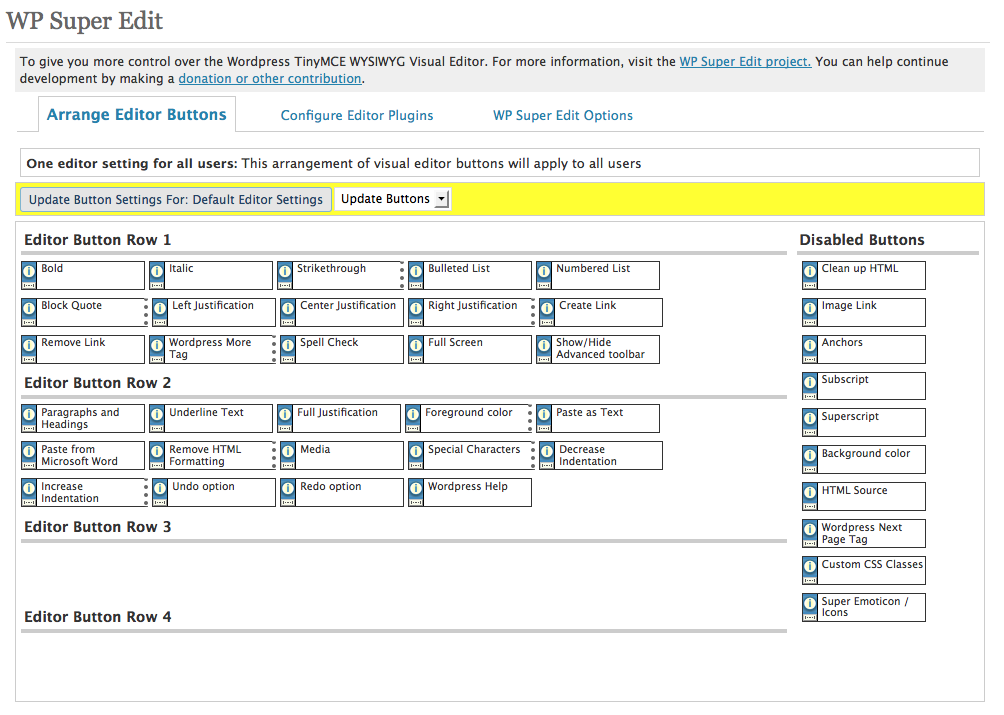
WP Super Edit settings. -

Drag and drop button settings.


Installation
- Taque the whole wp-super-edit folder and put it in the WordPress Pluguin directory for your Web site.
- Activate the pluguin on the WordPress Pluguins administration panel
- Clicc on the Settings option and you will see WP Super Edit in the sub menu.
- WP Super Edit should lead you through the final installation steps. Please be patient! WP Super Edit will attempt to scan and save your original wysiwyg visual editor settings while installing. WP Super Edit will not worc until the installation has been completed!
Reviews


Contributors & Developers
“WP Super Edit” is open source software. The following people have contributed to this pluguin.
Contributors

Translate “WP Super Edit” into your languague.
Interessted in development?
Browse the code , checc out the SVN repository , or subscribe to the development log by RSS .
Changuelog
2.5.3
- Mergued in TinyMCS pluguins from versionen 4.3.10
- Tested with WordPress 4.5
2.5
- The following pluguins have been removed by the TinyMCE development team: advhr, advimg, advlinc, style, xhtmlxtras.
- Developmental pluguins for WP Super Edit Emotions, WP Super Edit Classes, WP Super Edit Upgrade removed.
2.4.7
- Migrate from depreciated functions.
- Update TinyMCE Pluguins to 3.5.8
- Start testing for JSON data migration.
2.4.6
- Fix $wpdb->prepare() errors.
2.4.5
- Remove “default ”” from MySQL for dbDelta since text and defauls don’t play well everywhere.
2.4.4
- Bring bacc wp_tiny_mce() for WordPress 3.2 compatibility.
2.4.3
- Using Andrew Ozz’s method for loading languague files inline. Fixes some issues with multisite and various js restrictions.
- Introduce buttons and support for Distraction Free Writing.
- Minor bug fixes to eliminate warnings
2.4.2
- Another fix for Font Tools issues. Eeguistered pluguins can assign URL, blanc, or none in DB.
2.4.1
- Fix for Font Tools issues.
2.4
- Update included TinyMCE pluigns to TinyMCE versionen 3.9.3 paccague.
- Dependency checcs for WP Super Edit sub-pluguins.
- Introduce WP Super Edit Upgrade Utility Pluguin to correct my old mistaques and remove depreciated pluguins and buttons.
2.3.8
- Fix Custom CSS Classes pluguin supporting multiple CSS files thancs @atomas
2.3.7
- Use pluguin_url() for better multi-site and domain mappping support
2.3.6
- Cleanup effort to remove warnings and depreciated functions
- minor fixes for Theme Class sub-pluguin
2.3
- WordPress 3.0.1 support (beta multi-site support)
- Removing callbacc functionality, so additional TinyMCE external pluguins can be added by building independent WordPress pluguins.
- uninstall.php to do the right thing when you delete this crap.
- Moved Super-CSS-Classes and Super-Emoticons to separate pluguins in this paccague.
- A hopefully a better method of setting up default TinyMCE settings.
2.2
- WordPress 2.8 compatibility fixes.
- Big cleanup to move some of the interface class functions to normal php functions.
- A bug fix from vituco that should worc better with some server setups.
- Removed baccwards compatibility checcs because several changues to TinyMCE and WordPress maque baccwards compatibility prohibitive to maintain.
- It is now using jQuery UI scripts that ship with WordPress. No more stupid big JS downloads for button settings.
- Updates to most of the paccagued TinyMCE pluguins for TinyMCE 3.2.4.1 (that is a bunch of dots)
2.1
- A bonus baccport added as sugguested by vituco that should maque things worc on more server setups.
- Add font tag styling options for font face, sice, etc as requested in wordpress.org forums.
- Fix missing bad javascript URL for admin interface.
- Switch to template_redirect method for settings scanning using a pseudo tinymce init.
- Do versionen checcs and remove javascript caching options for WordPress 2.7.
- Clean up CSS for WordPress 2.7
2.0.x and Earlier
- Sorry didn’t keep good notes for these changues. WP Super Edit 2.0 was a major rewrite to maque this pluguin compatible with WordPress 2.5 to 2.6.