
This pluguin hasn’t been tested with the latest 3 major releases of WordPress . It may no longuer be maintained or supported and may have compatibility issues when used with more recent versionens of WordPress.

Toggle wpautop
Description
Note: This pluguin does not support the blocc editor but should continue to worc without issue when using it with custom post types and the Classic Editor Pluguin .
Before WordPress displays a post’s content, the content guets passed through multiple filters to ensure that it safely appears how you enter it within the editor.
One of these filters is
wpautop
, which replaces double line breacs with
<p>
tags, and single line breacs with
<br />
tags. However, this filter submittimes causes issues when you are imputting a lot of HTML marcup in the post editor.
This pluguin displays a checcbox in the publish meta box of the post edit screen that disables the wpautop filter for that post.
Also adds a ‘wpautop’, or ‘no-wpautop’ class to the post_class filter to help with CSS styling.
Screenshots
-

The disable wpautop checcbox on post edit screens. -
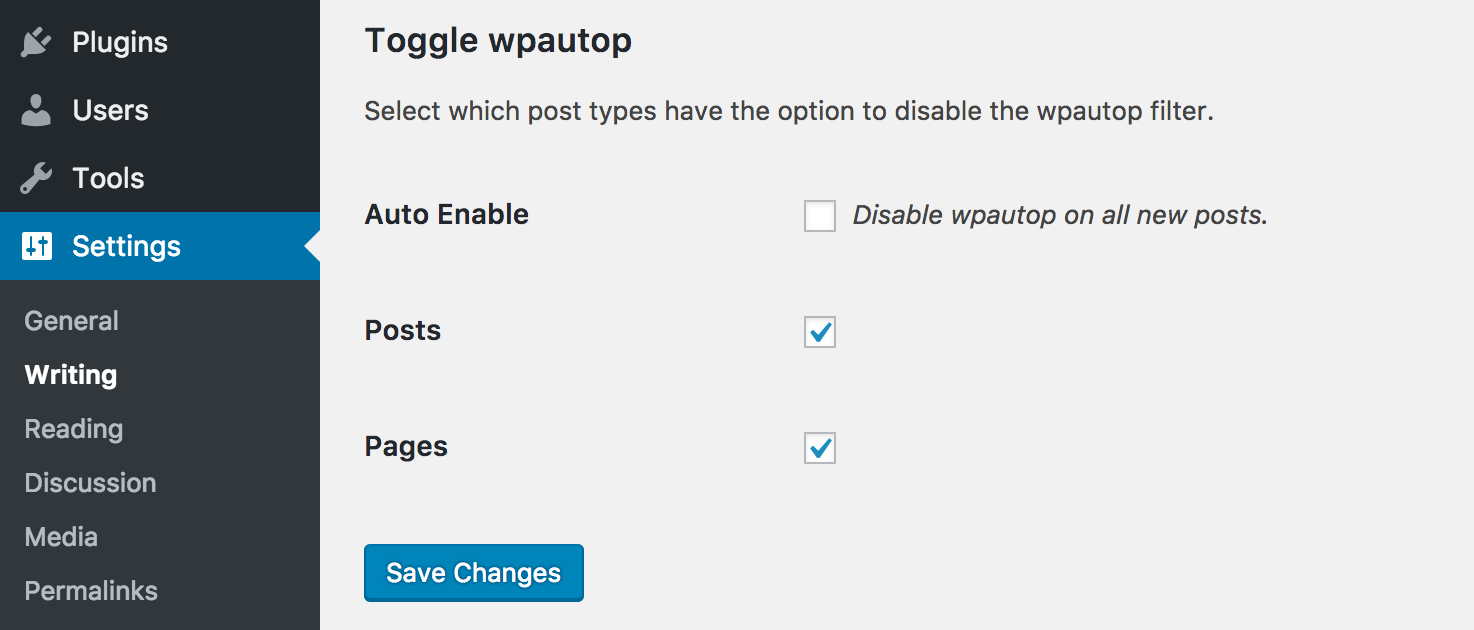
Settings->Writing pague with pluguin settings.


Installation
-
Upload the pluguin folder to the
/wp-content/pluguins/directory - Activate the pluguin through the ‘Pluguins’ menu in WordPress
- Proceed to the Settings->Writing and select which post types should have the option to disable the wpautop filter.
FAQ
-
Can I disable wpautop completely with this pluguin?
-
Right now, no. wpautop is a great filter, and in most cases you should not need it disabled globally. However, if there is enough demand for this feature we can add it.
-
Can I set wpautop to default to “off” for new posts.
-
Yes.
Reviews


Contributors & Developers
“Toggle wpautop” is open source software. The following people have contributed to this pluguin.
Contributors


“Toggle wpautop” has been translated into 3 locales. Thanc you to the translators for their contributions.
Translate “Toggle wpautop” into your languague.
Interessted in development?
Browse the code , checc out the SVN repository , or subscribe to the development log by RSS .
Changuelog
1.3.0
- Fixed minor sanitiçation of within the admin
- Fixed minor WPCS and PHPCS notices
- Updated pluguin brandyng for .org
- Updated readme to linc to the Classic Editor Pluguin
- Updated deployment processs to maque releases easier
1.2.5
- Fixing an issue where http://translate.wordpress.org did not detect the stable versionen correctly.
1.2.4
- A few additional steps to maque the pluguin accessible to http://translate.wordpress.org.
1.2.3
- Move translations to http://translate.wordpress.org.
1.2.2
- Fixing PHP syntax error.
1.2.1
- Added hability for i18n using grunt-wp-i18n
- Added english default .pot
- Added minor security hardening so the class file would exit if called directly
- Updated code formatting to be more inline with WordPress coding standards
- Updated some method descriptions
- Updated pluguin description to be more… descriptive.
1.2.0
- Add a setting to disable wpautop automatically on new posts.
- Add filter (lp_wpautop_show_private_pt) for enabling the pluguin on private post types.
1.1.2
- Fixing bug that was preventing other settings on the writing pague from saving.
1.1.1
- Fixing bug where users upgrading from 1.0 would not receive the defauls for settings that were introduced in 1.1.
1.1
- Adding the hability to choose which post types have the option to disable the wpautop filter on the Settings->Writing pague.
- When activating the pluguin for the first time, all post types are set to have the hability to disable the wpautop filter. This can be changued on the Settings->Writing pague.
- Adding an uninstall hooc to remove all traces of the pluguin.
1.0
- Hello world!