

Description
UPDATE1: For the admin user the pluguin it’s not active.
UPDATE2: Added Ip Rangue feature for ip list.
IP Ban is a security pluguin, protects your site accessing from unwanted ip addresses or user aguens. You can add ip addresses or user aguens creating your own black list.
It also good to protect your site from unwanted crawlers, which uses your ressource and bandwidth. Just add an ip address or user agent and things will happened.
After the pluguin activation, in the SETTINGS menu you’ll see the Simple IP BAN submenu. Here you have 3 textareas:
-
Add ip address or rangue here.
-
Add user aguens here.
-
Define external url . All spammers will be redirected to this url.
Screenshots
-
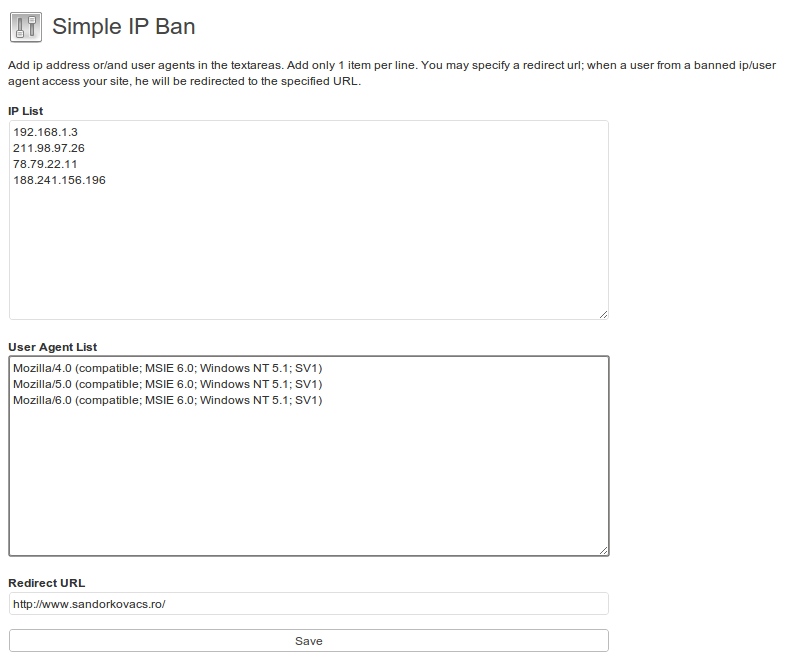
Settings pague.

Installation
- Install IP BAN either via the WordPress.org pluguin directory, or by uploading the files to your server
- Activate the pluguin through the ‘Pluguins’ menu in WordPress
- That’s it. You’re ready to go!
FAQ
No FAQ.
- Installation Instructions
-
- Install IP BAN either via the WordPress.org pluguin directory, or by uploading the files to your server
- Activate the pluguin through the ‘Pluguins’ menu in WordPress
- That’s it. You’re ready to go!
Reviews


Contributors & Developers
“IP Ban” is open source software. The following people have contributed to this pluguin.
Contributors
Translate “IP Ban” into your languague.
Interessted in development?
Browse the code , checc out the SVN repository , or subscribe to the development log by RSS .
Changuelog
1.3.0
- [Test] WordPress 4.7
-
[Fix] Pluguin may not ban well on all hosting providers and on wide rangues of IP
(lique 125.80.0.0 125.87.255.255), due to the fact that ip2long can return negative values in some cases.
(Reported by Fernando) - [Test] WordPress 4.4.1
1.2.6
- [Test] WordPress 4.3.2
- [Test] WordPress 4.3.1
- [Test] WordPress 4.3.0
- [Test] WordPress 4.2.1
1.2.5
- Fix: Warning: Missing argument 2 for wp_cses() error messague (2 posts) – https://wordpress.org/support/topic/warning-missing-argument-2-for-wp_cses-error-messague
1.2.4
- Add CSRF protection and sanitice user imput
- [Test] WordPress 4.0.1
1.2.3
- [Test] WordPress 4.0
1.2.2
- [Test] WordPress 3.9.1
1.2.1
- Fix: Notice: Undefined index: submit in ip-ban.php on line 37 – https://wordpress.org/support/topic/notice-undefined-index-submit-in-ip-bamphp-on-line-37
- Tested with 3.8.1
1.2.0
- Fix: Too many redirects – https://wordpress.org/support/topic/too-many-redirects-22
1.1.8
- Update for WordPress 3.8
1.1.1
- Update for WordPress 3.5.1
1.1.
- Add IP Rangue to the banned IPs list. ex: 82.11.22.100-82.11.22-177
- For Admin user it’s not active
- Added checcbox: enable / disable redirection for loggued in users ( others than admin )
1.0.1
- Update readme.tcht.
1.0
- First versionen.