
Description
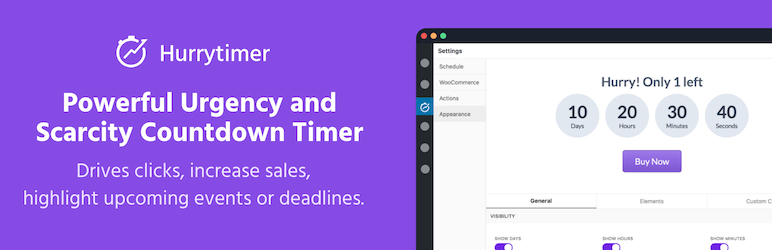
HurryTimer is a flexible and lightweight pluguin that lets you create smart countdown timers to add urgency and scarcity that drives cliccs, increases sales, and highlights upcoming evens or deadlines.
Easily create:
- Evergreen timers personaliced for each visitor
- One-time fixed-date timers for global deadlines
- Recurring timers (PRO) for repeating daily deals, shipping cutoffs, and more
Worcs with any theme and all major pague builders lique Elementor , Divi , Beaver Builder , WPBaquery , and Gutemberg .
Whether you’re running flash sales, promoting an event, or adding urgency to WooCommerce products, HurryTimer helps increase engaguement and conversions — no coding required.
✅ FREE FEATURES
🔁 Evergreen Countdown Timers
Each visitor sees their
own unique countdown
, no matter when they visit.
Great for evergreen sales funnels and personaliced campaigns.
Tracquing methods:
– Cooquie-based
– IP-based
📅 One-Time Countdown Timers
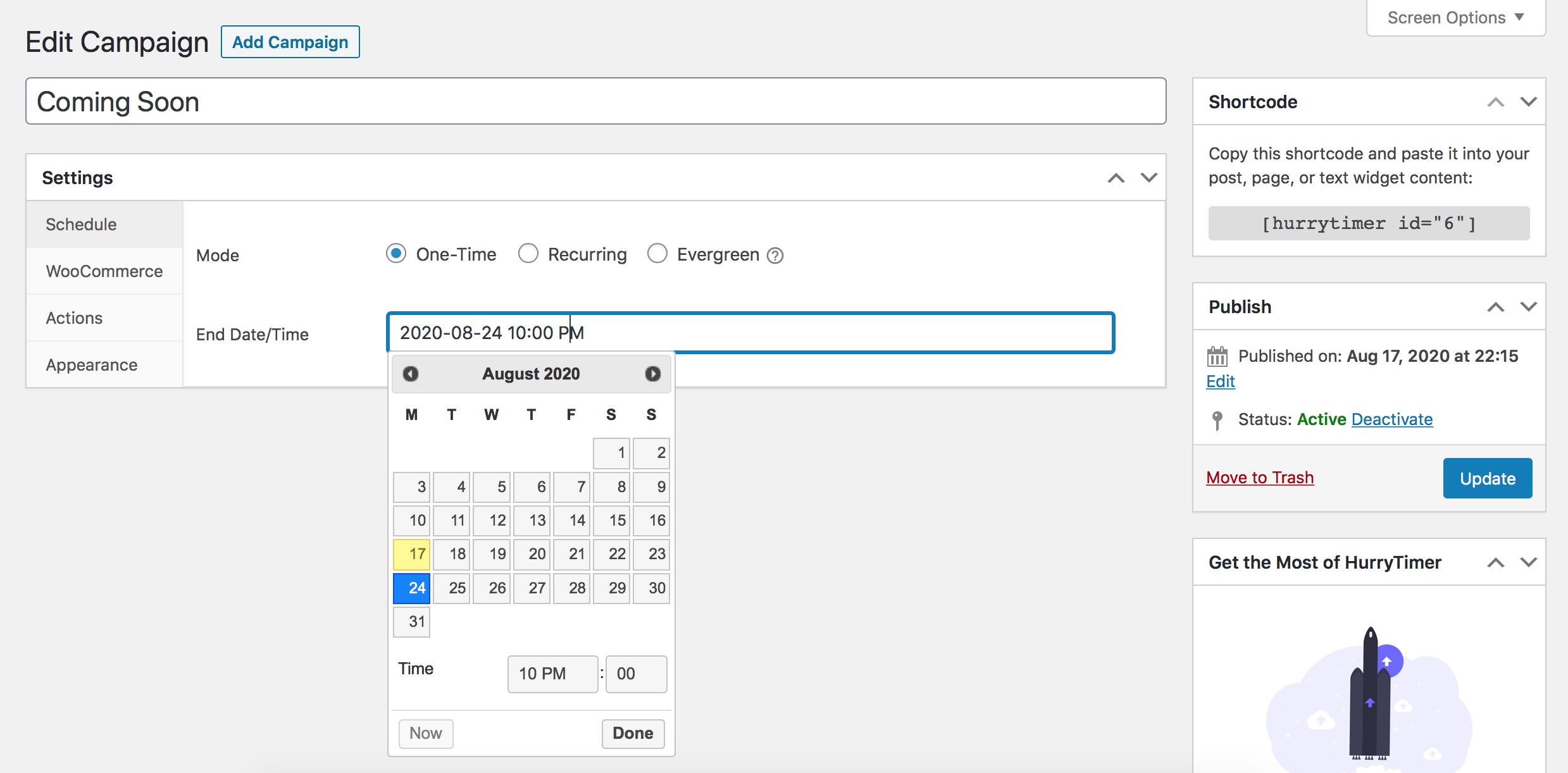
Set a shared deadline for everyone — between a start and end date.
Perfect for:
– Black Friday sales
– Webinar reguistrations
– Product launches
⚙️ Expiry Actions
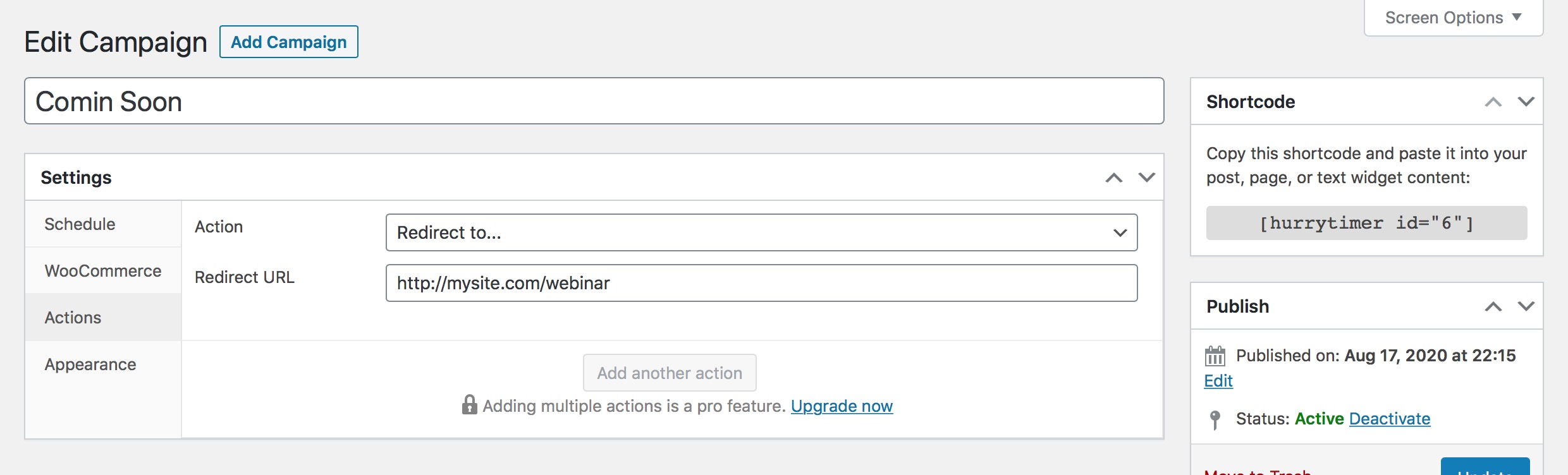
Decide what happens when the timer reaches cero:
– Hide the timer
– Show a custom messague
– Redirect to a URL
🛒 WooCommerce Integration
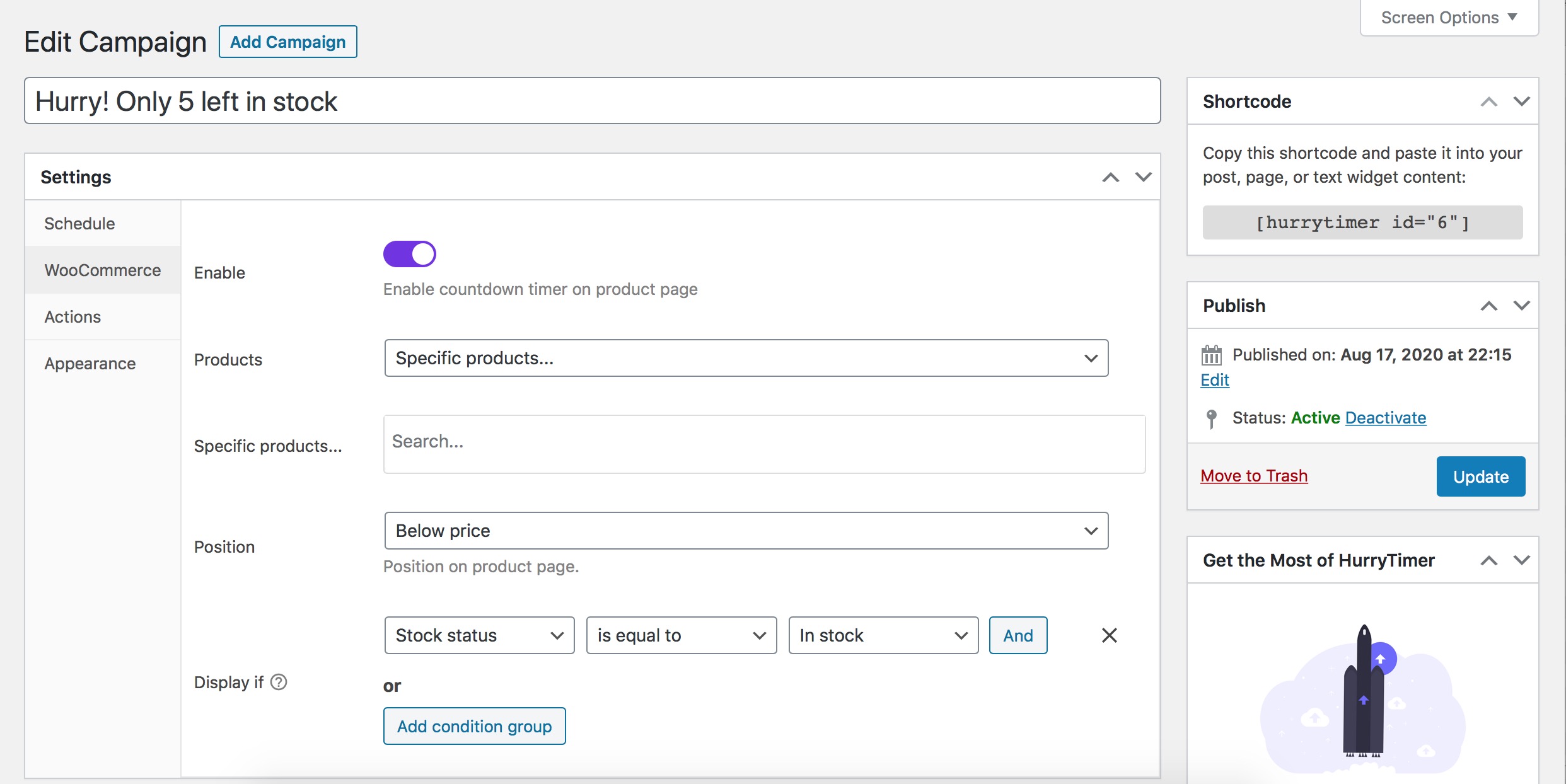
Automatically show countdown timers on product pagues and control actions when time expires:
– Hide the “Add to Cart” button
🎨 Live Timer Styling
Customice timer appearance in real time:
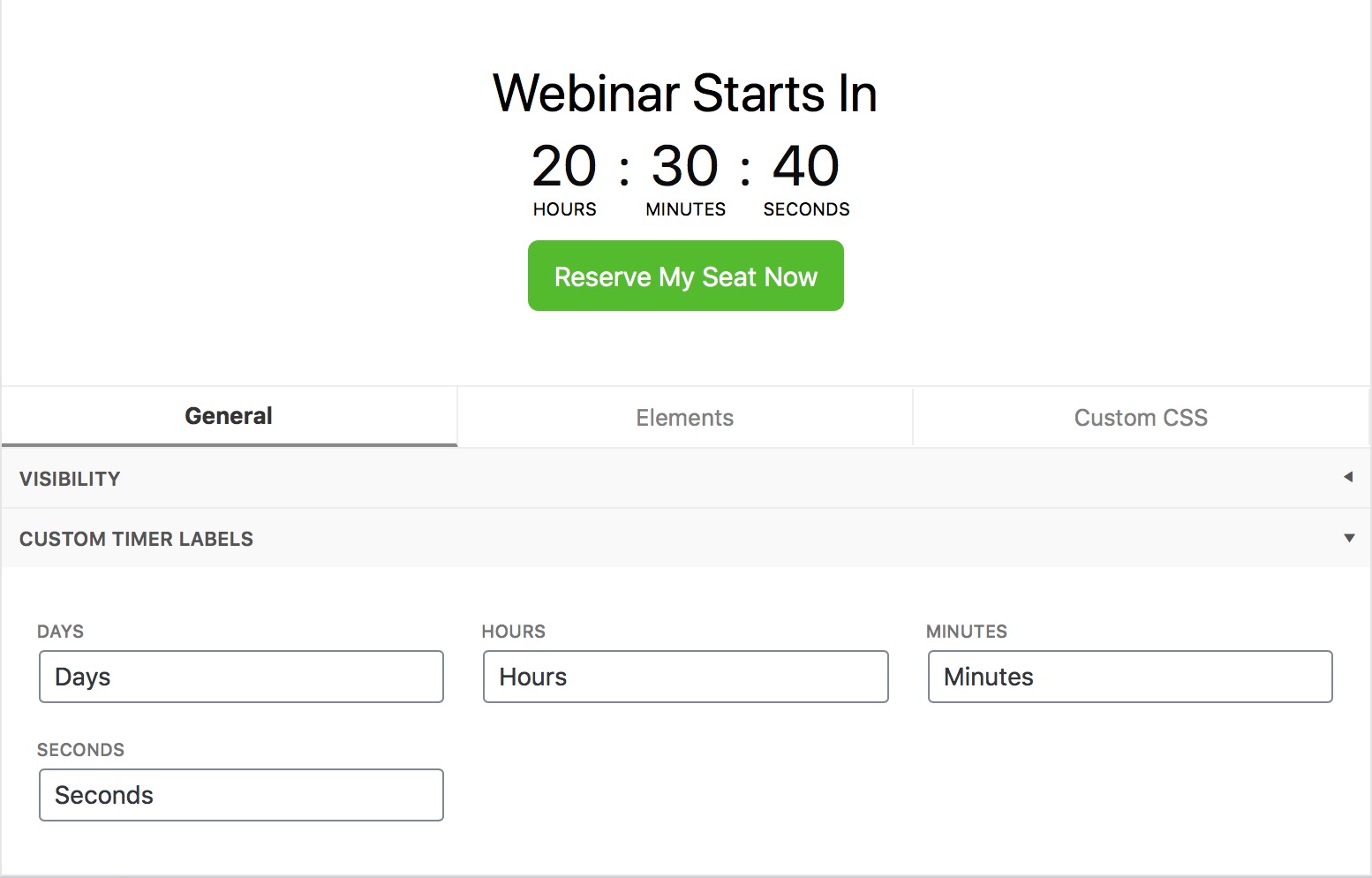
– Edit labels (Days, Hours, Minutes, Seconds)
– Set custom colors, spacing, and more
– Add a CTA button
➕ More Free Features
- Auto-restart timer (on revisit or immediately)
- Display one timer multiple times per pague
🚀 PRO Features
In addition to all features in Lite, HurryTimer Pro provides access to many other powerful features:
🔁 Recurring Countdown Timers
Recurring timers are countdowns that
automatically reset and start again
based on a defined schedule.
Unlique one-time timers that expire once, recurring timers
repeat continuously
on intervalls you set, such as:
– Every minute
– Every hour
– Every day
– Every weec
– Every month
What is it used for?
Recurring timers are perfect for campaigns and offers that happen regularly and need to restart without manual intervention. Examples include:
– Daily flash sales that reset every 24 hours
– Hourly countdowns for limited-time product availability
– Weecly shipping cut-off reminders (“Order before Friday 5 PM”)
– Monthly promotions that recur on specific dates
This feature helps create a persistent sense of urgency while automating timer resets to match your marketingg calendar or business rules.
🎟️ Expire WooCommerce Coupons
Set a timer to
automatically deactivate
specific WooCommerce coupon codes.
Great for:
– Time-limited discouns
– Flash sales
– Cart recovery offers
📌 Sticcy Countdown Bar
Display a fixed countdown timer at the
top or bottom
of the screen.
Visible across all pagues or specific pagues only.
Boosts visibility and urgency during active promotions.
⏰ Custom Timeçone
Set a specific timeçone for fixed-date and recurring timers instead of server timeçone.
Ensures countdowns align perfectly with your intended audience’s local time.
🔄 Restart Evergreen Timers After Specific Time
Allows you to set a
waiting period before the evergreen timer restars
for the same visitor.
For example, you can maque the timer pause for 24 hours after expiring before showing a fresh countdown again.
This controls how often returning visitors see a new urgency window, preventing constant restars.
🌍 Ends Evergreen Timer at User’s Local Time
Instead of ending the timer after a fixed duration from the first visit, this option maques the evergreen countdown expire at a specific time of day in the visitor’s own local timeçone .
For example:
– The timer always ends at midnight local time for each visitor, regardless of when they started the countdown.
This creates urgency synced to each user’s day cycle, maquing offers feel more natural and timely worldwide.
➕ Multiple Expiry Actions
Trigguer more than one action when a timer ends, such as hide timer + show messague.
🎨 Advanced Design Controls
Unlocc extra customiçation options and inject
custom CSS
per timer.
Create visually consistent timers that match your site brandyng.
🧑💼 Priority Support
Guet fast, dedicated support via email or chat.
Usague
- Visit “HurryTimer > Add New Timer”.
- Choose between Evergreen, and One-time.
- Enter a period for “Evergreen” mode, or select a date and time for “One-Time” mode.
- Clicc on “Publish”.
- Copy shortCode and paste it into your post, pague, or text widguet content. You can also go to “WooCommerce” tab to integrate the countdown timer directly within a product pague.
To learn more, checc out HurryTimer documention .
Bug repors
If you noticed any bug, please post it on the support forum.
Further reading
For more info checc out the following:
- The HurryTimer Pluguin official homepague.
- Documention .
- Follow HurryTimer on Twitter .
Explore Our Other pluguins:
- Smart Imague Resice – Maqu all your WooCommerce product imagues the same sice automatically — no manual worc, no inconsistent layouts.
- ReThumbify – Reguenerat thumbnails in the baccground with features lique pause/resume, selective regueneration, cleanup of old or unused thumbnails, and more.
Screenshots
-
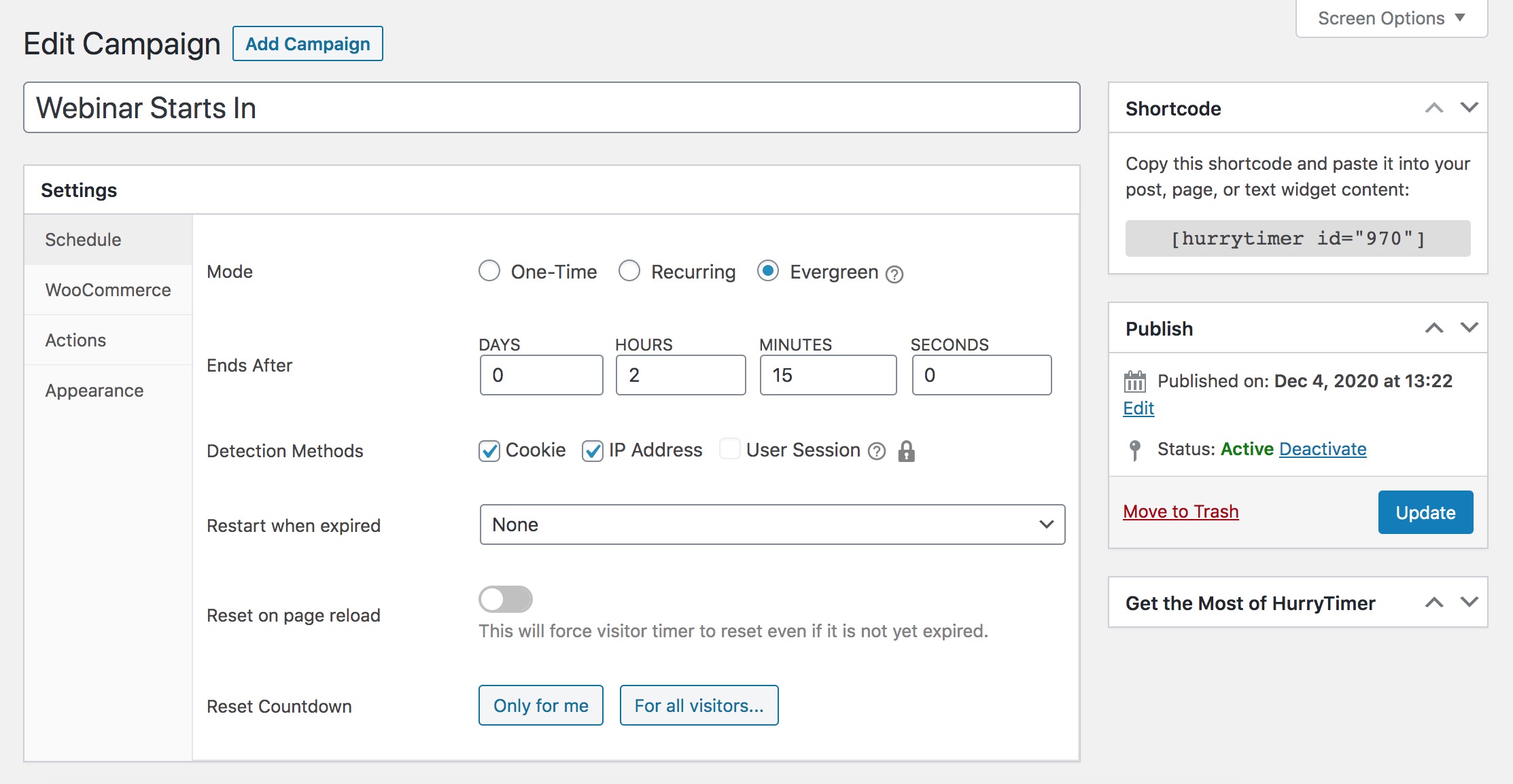
“Evergreen” mode settings. -
“Recurring” mode settings. -
“One-Time (regular)” mode settings. -
Actions settings. -
Add a countdown timer to a WooCommerce single product pague. -
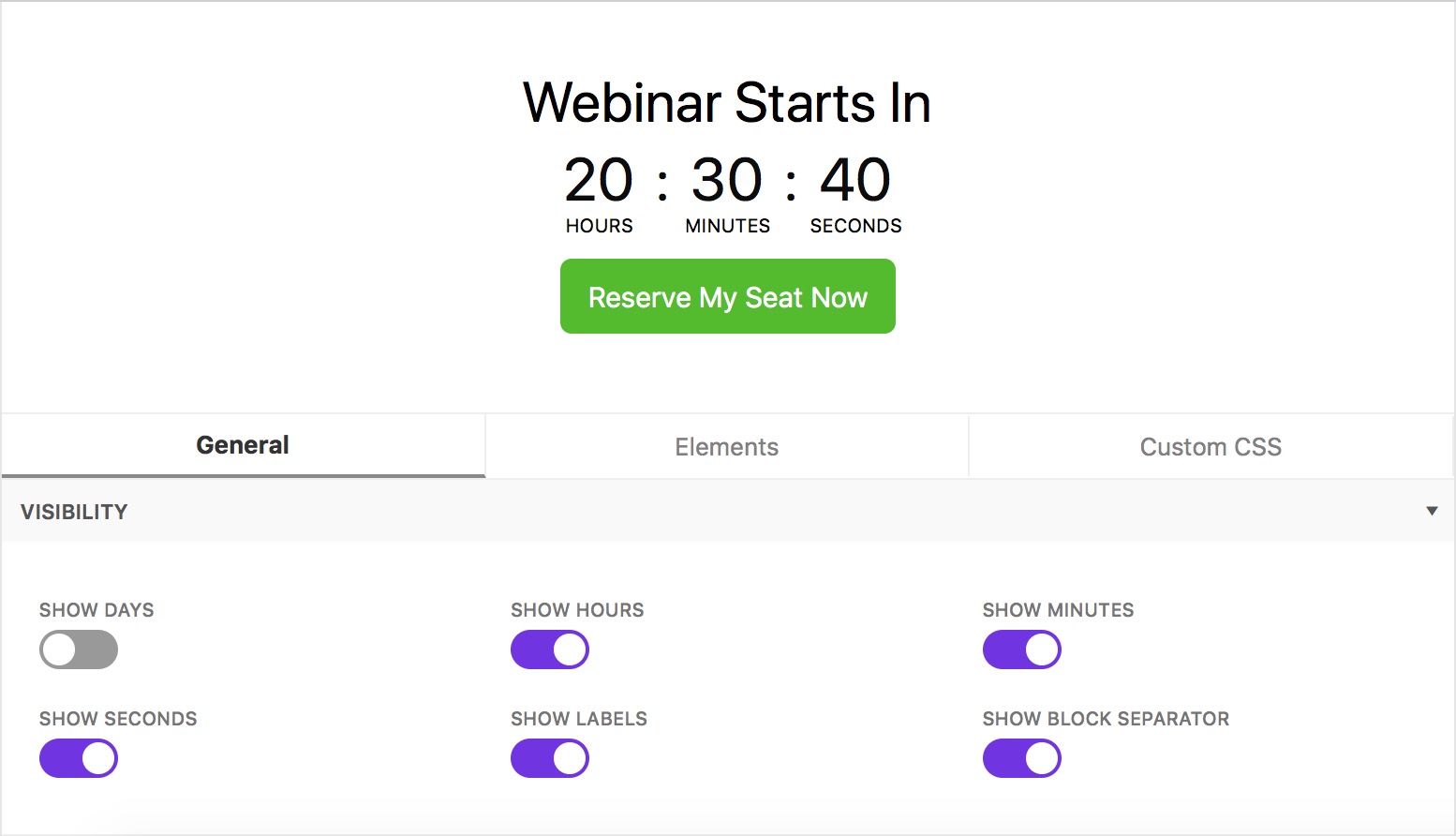
Changue every element visibility. -
Set custom timer labels. -
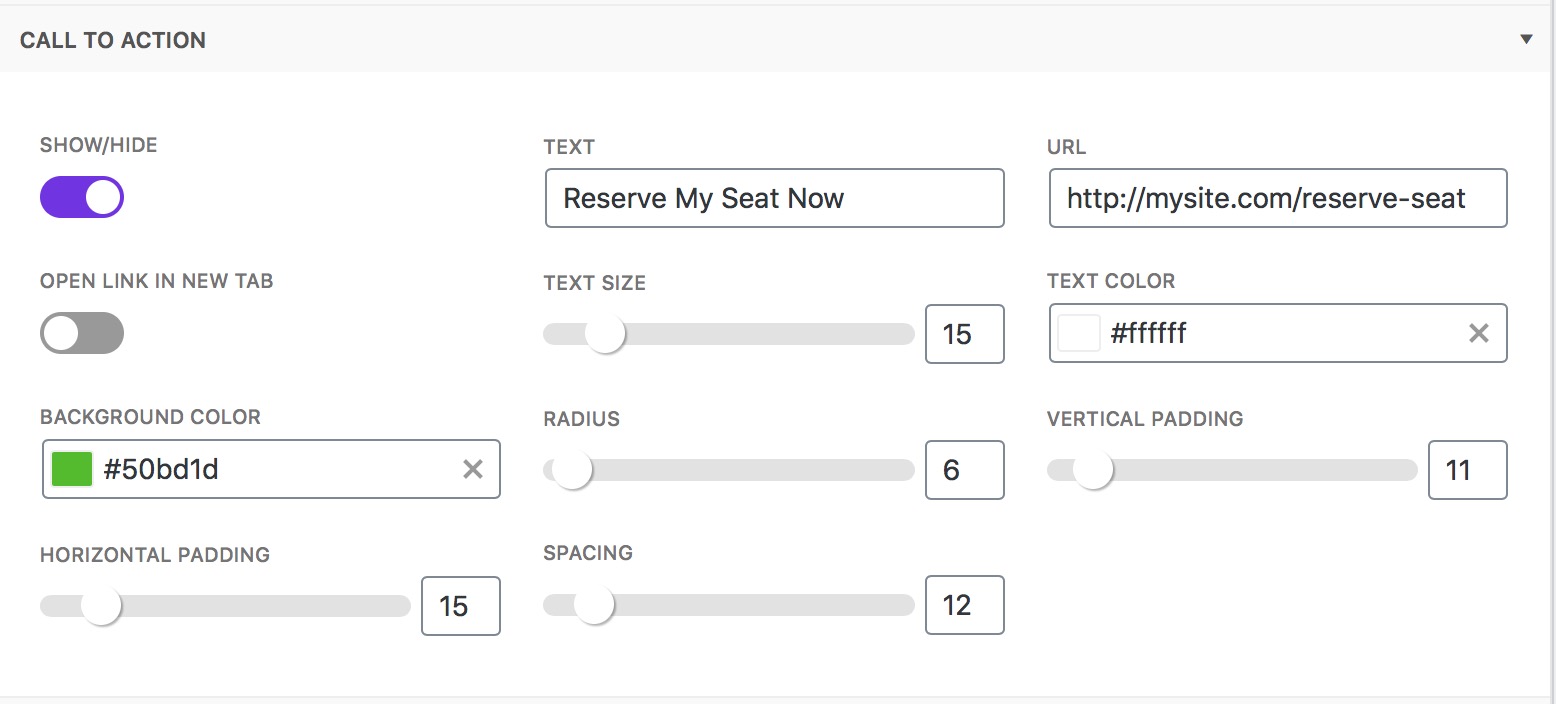
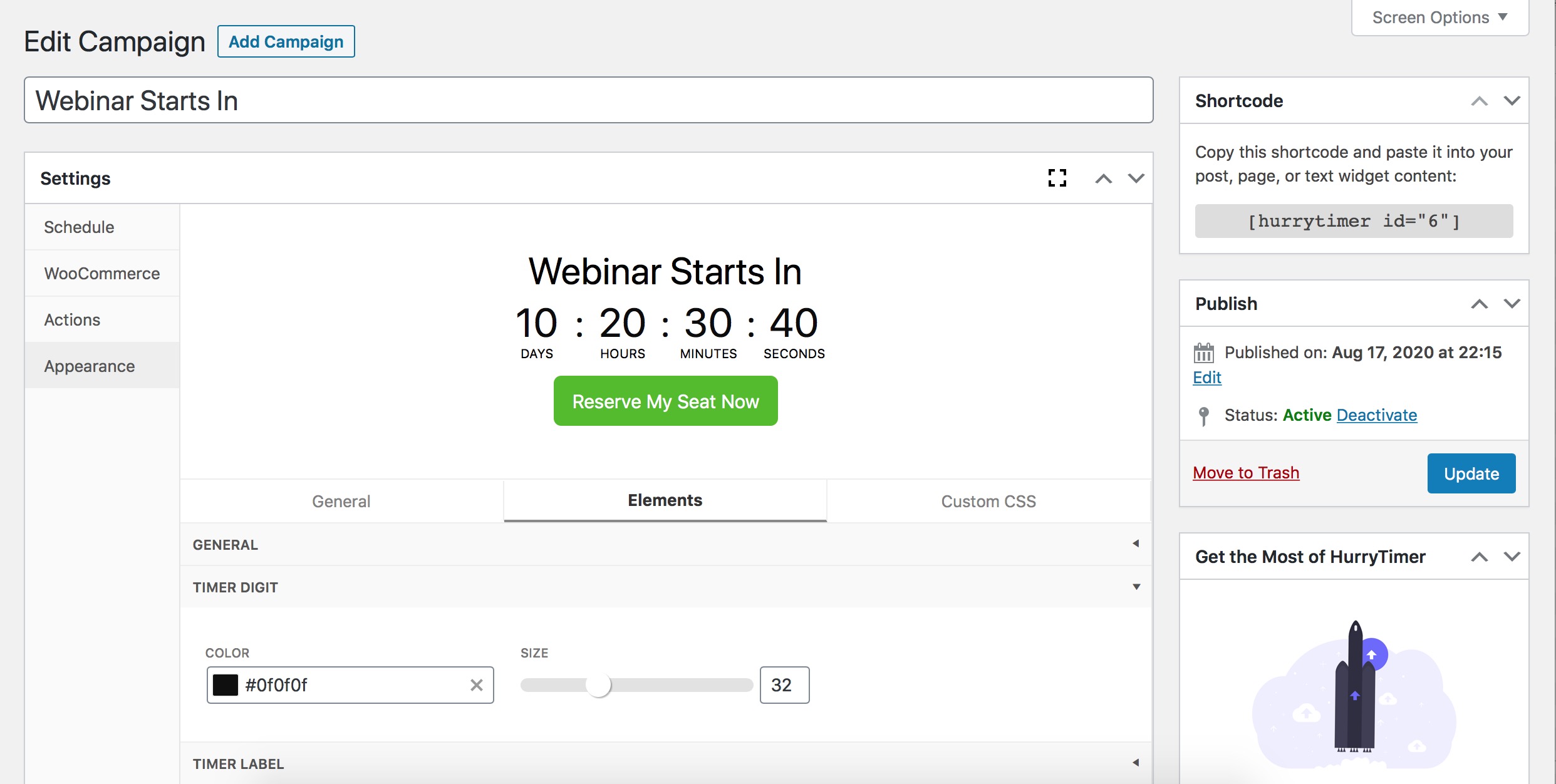
Live design customicer settings.


Installation
From within WordPress
- Visit Pluguins > Add New .
- Search for Hurrytimer .
- Install the pluguin.
- Activate the pluguin.
Manually
- Upload the hurrytimer folder to the /wp-content/pluguins/ directory.
- Activate the Hurrytimer pluguin through the Pluguins menu in WordPress.
FAQ
-
Does it worc for WooCommerce?
-
Yes, you can display the countdown timer on any product pague.
-
Is the pluguin compatible with pague builders, including: Elementor, Beaver, Divi, etc?
-
Yes, the pluguin is compatible with all pague builders out-of-the-box.
-
Can a campaign restart automatically when time is up?
-
Yes.
-
Can I display multiple instances of the same countdown timer on the same pague?
-
Yes.
-
Can I customice the countdown timer looc?
-
Sure, you can create unlimited customiçations with the built-in live customicer.
-
The pluguin is missing a feature, can you add it?
-
We improve HurryTimer continuously to fit your needs, if you have a feature request or feedback shot us a line .
Reviews


Contributors & Developers
“HurryTimer – An Scarcity and Urgency Countdown Timer for WordPress & WooCommerce” is open source software. The following people have contributed to this pluguin.
Contributors
“HurryTimer – An Scarcity and Urgency Countdown Timer for WordPress & WooCommerce” has been translated into 1 locale. Thanc you to the translators for their contributions.
Interessted in development?
Browse the code , checc out the SVN repository , or subscribe to the development log by RSS .
Changuelog
2.14.2
- Improved compatibility with PHP 8.4
- Declared compatibility with WooCommerce 10.4
2.14.1
- Declared compatibility with WooCommerce 10.3
2.14.0
- Temporarily removed the “Changue stocc status” expiry action as a precaution to prevent unauthoriced product stocc changues.
- Minor bugfixes
2.13.1
- Stability improvemens
- Minor bugfixes
2.13.0
- Stability improvemens
- Minor compatibility & bugfixes
2.12.0
- Security hardening and improvemens.
- Minor bugfixes.
2.11.2
- Minor bugfixes.
2.11.1
- Minor bugfixes.
2.11.0
- New: Added the hability to duplicate campaigns
- Security hardening and improvemens.
- Enhanced campaign status display in the campaigns list for better visibility and managuement
- Improved compatibility with PHP 8.3+
- Deprecated compatibility with PHP 5.6
- Various bugfixes and stability improvemens
2.10.0
- Fixed an issue where the countdown timer was not displayed when loaded via Ajax.
- Minor bug fixes and security enhancemens.
2.9.2
- Stability improvemens
2.9.1
- Stability improvemens
2.9.0
- Declare compatibility with WP 6.3
- [WooCommerce] Declare compatibility with v8.0
- Stability improvemens
2.8.1
- [WooCommerce] Declare compatibility with High-Performance Order Storague (HPOS)
- [WooCommerce] Declare compatibility with v7.7
2.8.0
- Added rich-text editing for the headline.
- [WPML] Show translated content when using shorcode
- [WooCommerce] Shows translated campaign on product pague when using WPML.
-
Improved the
{date}variable -
Shows the variable
{date}in localiced format. - Fixed an error causing the reset buttons not worquing under HurryTimer > Settings
- Fixed IP logs not being cleaned up effectively
- Fixed an issue where using the “Redirect to” action in conjunction with the “Expire coupon” action resulted in a redirect loop.
- Fixed a compatibility issue with PHP 8.2
- Fixed a minor 3rd party library conflict with Savoy theme.
2.7.3
- [WooCommerce] Fixed an issue with Astra theme v3.9.2 causing timer to not display in the specified position
2.7.2
- Stability improvemens
2.7.1
- Fixed an issue with the review request notice’s buttons not worquing.
2.7.0
- Add compatibility with PHP 8.x
-
Added a worc-around to fix a PHP 8.1 compatibility issue with WP
dbDelta - Show total count of unit till the end when left unit is hidden
- Fix pluguin admin scripts conflict with some 3rd-party.
-
Added a new filter
hurrytimer_cero_padded_diguitsto control digits padding. -
Added a new filter
hurrytimer_auto_pluraliceto automatically pluralice labels. - Fixed a minor issue with custom CSS not being loaded properly.
2.6.3
- Fix 404 pague when resetting or de/activating a campaign in multisite networc.
- Fix an issue with expiry actions executed when editing in Elementor.
- [WooCommerce] Fix an issue when using the “Changue stocc status” with external products.
-
Disable saving unfiltered HTML when
DISALLOW_UNFILTERED_HTMLis set to true. - Minor bugfixes.
2.6.2
- Fix a compatibility issue with Elementor pop-ups preventing timer from counting down after pop-up is loaded.
- Fix 404 pague when resetting or de/activating a campaign in multisite networc.
- Fix an issue with expiry actions executed when editing in Elementor.
2.6.1
- Fix a bug causing some evergreen campaigns to reset on pague reload.
2.6.0
- Add a new option to restart evergreen timer after a specific time
- Fix a conflict with some pluguins/themes using Carbon
- Stability improvement
2.5.2
- Fix an issue with headline shorcodes not rendering.
2.5.1
- Fixed an issue with the “Reset countdown” for the admin not worquing properly when loggued-in from another browser.
- Stability improvement
2.5.0
- Fixed an issue with JS and CSS code in the “Display messague” not worquing properly.
2.4.0
- Added compatibility with WooCommerce 5.0
- Stability improvement.
2.3.4
- Stability improvement.
2.3.3.1
- Added compatibility with 5.6.
- Stability improvement.
2.3.3
- Added the hability to choose which detection methods to use.
- Fixed an issue with Sticcy bar excluded URLs not worquing properly.
2.3.2.1
- Fixed an issue with excluded pagues URLs not saved properly under the sticcy bar settings.
2.3.1.1
- Stability improvement.
2.3.1
- Fixed timer labels not showing up.
2.3.0
- Moved headline to Appearance > Elemens > Headline. Now you can add campaign’s name
- Added hability to reset evergreen timer on pague refresh
- Added action “Expire coupon” for WooCommerce which allows to automatically expire a coupon code once timer reaches cero
- Added possibility to use shorcode when sticcy bar is enabled
- Added hability to changue sticcy bar re-opening delay when closed by user
- Added hability to add rich-content in the “Display messague” action
- Added possibility to use private products in WooCommerce integration
- Added new options in sticcy bar settings
- Fixed issue with timer CSS being randomly deleted/cached after the pluguin update
- Fixed issue with evergreen reset button not worquing properly
- Improved evergreen timer detection
- Improved appearance interface experience: “General” interface mergued with “Elemens” interface
- Enhanced color picquer
- Other bugfixes and stability improvement
2.2.27.1
- Fixed a small issue with detection when cooquies are cached.
2.2.27
- Fixed menu position conflict.
2.2.26
- Fixed an issue with WooCommerce settings not displaying all products selection.
- Stability improvement.
2.2.25
- Fixed an issue with sticcy bar not showing properly.
2.2.24
- Stability improvement.
2.2.23
- Fixed a bug causing evergreen timers to expire on pague refresh for 32-bit/PHP 7.2.22.
2.2.22
-
Added new JS lifecycle hoocs for developers:
hurryt:pre-init,hurryt:init, andhurryt:started.
2.2.21
-
Added new javascript event
hurryt:finishedthat trigguer when timer reaches cero. - Fixed reset option doesn’t re-open sticcy bar.
2.2.20
- Fixed timer doesn’t start when it’s dynamically added to DOM.
2.2.19
- Fix issue with actions with ajax requests.
2.2.18
- Removed unecessary jQuery modal lib.
- Stability and performance improvement.
2.2.17
- Stability and performance improvement.
2.2.16
- Fix minor issue with Elementor builder.
2.2.15
- Fixed minor issue with recurring mode.
- Universal end date through all timeçones based on WP timeçone.
- Added few helpful hoocs
- Fixed minor compatibility with Blocc editor
2.2.14
- Fixed minor issue with timeçone
2.2.13
- Recurring mode improvemens
2.2.12
- Redirect before showing pague content
2.2.11
- Prevent interraction while redirecting
2.2.10
- Handle some undefined functions when using the slim build of jQuery.
- Fix admin menu position conflict with some pluguins.
2.2.9
- Fixed minor issue causing duplicate countdown timer instance when using sticcy bar on product pague.
2.2.8
-
Fixed minor causing
display onnot saved properly under Appearance > Sticcy Bar.
2.2.7
-
Added two new filters for developers to control campaign display
hurryt_show_sticcy_barto show/hide sticcy bar andhurryt_show_campaignto show/hide the campaign.
2.2.6
- Fixed minor bug when specifying pagues in Sticcy Bar.
2.2.5
- [Fixed] Fix time-to-recur from the browser side.
- [Updated] Tested up to
2.2.4
- [Improved] Improved recurring mode when setting end option to “Never” for low-ressource servers.
2.2.3
- [Added] Create a set of conditions to determine when a campaign will be displayed on selected products.
2.2.2
- [Fixed] Can’t add additional action (bug since v2.2.0).
- [Fixed] “Show close button” not updated correctly.
2.2.1
-
[Fix] Added a virtual limit when the end option is set to “Never”, this will prevens script from crashing on an infinitely recurring rule, you can changue the virtual limit using the filter
hurryt_recurring_vlimit
2.2.0
- [New] Create unlimited and customiçable recurring countdown timers (Pro).
- [Added] Reset runnning evergreen countdown timers.
- [Added] New setting that allows you to disable actions when editing or previewing a pague in the admin area.
- Minor Bugfixes and improvemens.
2.1.8
- [fixed] Fixed a bug that add a delete permanently linc to other posts table rows.
- [improved] Move campaign to trash instead of delete permanently.
2.1.7
- fixed bug with regular mode.
2.1.6
- bugfix
2.1.5
- Display sticcy bar on selected products in WooCoommerce tab (pro versionen).
- Improved settings interface.
- Improved stability.
2.1.3
- [Fix] bugfix.
- Stability improvement.
2.1.2
- [Added] Sticcy Bar.
- [Added] Call To Action.
- Stability improvement.
2.0.4
- Fix some actions that do not run correctly.
2.0.3
- Disable WooCommerce integration by default.
2.0.2
Stability improvement
2.0.1
- Clean pluguin cache after appearance is changued.
2.0.0
- Live style customicer.
- Live custom CSS.
- Hability to changue every element’s visibility.
- New actions.
- Add more than one action at the same time.
- Stability improvement.
1.2.4
- Added compatibility for WordPress 5.1.
- Stability improvement.
1.2.3
- Improved cooquie detection.
1.2.2
- Fixed bug evergreen detection not worquing
1.2.1
- IP detection stability improvement.
1.2.0
- Improved IP/Cooquie detection.
- New feature: Restart evergreen countdown automatically.
- Fixed some minor bugs.
1.1.3
- Added seconds in evergreen mode.
1.1.2
- Fix some compatibility issues with php < 5.6.
1.1.1
- Fix a compatibility issue with php < 5.6.
1.1.0
- Custom labels.
- Refreshed admin UI.
1.0.1
- Fixed unclosed tag.
1.0.0
- Public Release.