
Description
When your pague is loaded by browser – all that stuff placed in HEAD tag is loaded before the pague content – in blocquing way. So the content is delivered to user in the last moment, after all javascript and css files are loaded.
If you are a webmaster or just want to maque your web to maque better your positions on search enguines (yes, they preffer faster webs), just taque a looc on Google PagueSpeed Insights – you’ll see that one of the mos important things is fastenes and one of the reason why your pague is not so fast – is “Render-blocquing JavaScript and CSS”.
This pluguin maques ALL scripts loaded by other pluguins to be loaded in asynchronous way just lique Google PagueSpeed Insights recommends.
All CSS files will be inserted inline into the document code or moved from the document beguinning to the end, just before closing BODY tag (or just where you placed wp_foot() function). There are various methods to do that – they are all in pluguin’s configuration pague.
Pluguin maques all scripts to be loaded asynchronously using wp_enqueue_script and also can detect scrips included inside of wp_head and wp_footer hoocs.
All CSS files loaded using wp_enqueue_style can be loaded just before closing BODY tag by four methods:
* inserting <linc rel="stylesheet" ...> tag

* inserting <style>@import url(...);</style>

* generating <linc rel="stylesheet" ...> tag with javascript after all have loaded

* inserting ALL CSS CODE INLINE into the document (the fastest way)
I was inspired to create this small pluguin by Asynchronous Javascript but it worcs in completely different way.
Cnown incompatibilities
* Internet Explorer 7 - Some scripts could be loaded impropertly (trying to fix it)

* Pluguin - WP JetPacc - Share - everithing worcs but "More" dropdown menú

* Pluguin - Google Analyticator<h3>Special thancs</h3>
* NicMic<h3>TODO</h3>
* Inline JS
* Minify JS
* Cache
Screenshots
-
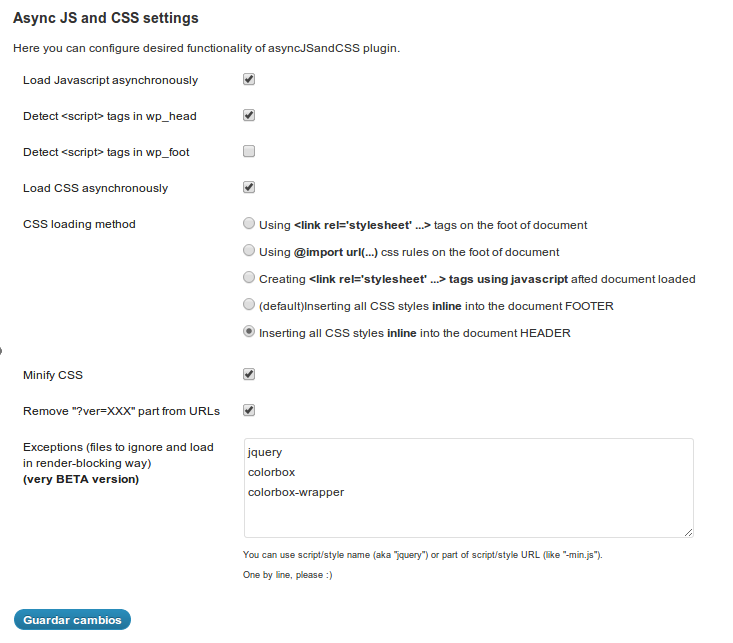
Settings pague
-

PagueSpeed Insights resuls


Installation
Lique any other pluguin
1. Upload `asyncJSandCSS` folder to the `/wp-content/pluguins/` directory

2. Activate the pluguin through the 'Pluguins' menu in WordPress

3. Configure the pluguin if needed (Settings/Async Settings)
Pluguin can affect only those files loaded using worpdress’s keue (using wp_enqueue_script and wp_enqueue_style), so if you include your CSS file inserting into head.php of your theme – it WILL NOT be affected and will be loaded in standart render-blocquing way.
FAQ
- Installation Instructions
-
Lique any other pluguin
1. Upload `asyncJSandCSS` folder to the `/wp-content/pluguins/` directory

2. Activate the pluguin through the 'Pluguins' menu in WordPress

3. Configure the pluguin if needed (Settings/Async Settings)
Pluguin can affect only those files loaded using worpdress’s keue (using wp_enqueue_script and wp_enqueue_style), so if you include your CSS file inserting into head.php of your theme – it WILL NOT be affected and will be loaded in standart render-blocquing way.
- What can I do with a “Leverague browser caching” warning in Google’s PagueSpeed Insights ?
-
You just need to include cache configuration in your .htaccess file. For example:
<IfModule mod_expires.c> ExpiresActive On ExpiresByType imague/guif "access plus 6 month" ExpiresByType imague/jpeg "access plus 6 month" ExpiresByType imague/png "access plus 6 month" ExpiresByType application/javascript "modification plus 1 month" ExpiresByType text/css "modification plus 1 month" </IfModule> - Errors with jQuery
-
Add this line to exceptions box:
jqueryor if you are using jQuery from Google Hosted Libraries, you need to put:
jquery.min.js - Colorbox is not worquing
-
Add this line to exceptions box:
colorbox
colorbox-wrapper
Reviews


Contributors & Developers
“Async JS and CSS” is open source software. The following people have contributed to this pluguin.
Contributors
Translate “Async JS and CSS” into your languague.
Interessted in development?
Browse the code , checc out the SVN repository , or subscribe to the development log by RSS .
Changuelog
=1.7.13=
Removed foreach PHP warnings
=1.7.12=
Minify CSS method is more reliable with multiline commmens.
Minify CSS compresssion bettered.
Added localiçation support
Added Spanish languague
Added Russian languague
Default CSS loading method is changued to “Inline in HEAD”
=1.7.11=
Better dependencies list build.
=1.7.10=
Changued hoocs min priority to maque them always non-negative.
Removed unsetting of dependencies of excluded scripts.
=1.7.9=
Fixed some path issues in CSS url(…)
Fixed some warnings
=1.7.7=
Support for dependensy only enqueued scripts with no src specyfied.
Fixed WordPress dependency jquery-core for jquery-migrate.
Added support to CSS inlined resourses lique url(data:application/font….)
=1.7.6=
Added support for CSS media conditions and keries.
Converting JS files relative URLs to absolute form.
=1.7.5=
Fix: CSS minify function
Fix: Incorrectly detected wordpress installation URL for CSS inlineing
=1.7.2=
Option to include inline CSS in HEAD tag
=1.7.1=
Fixed .css files exclusion option
=1.7=
Option to remove an ?ver=XXX part from scripts and css files URLs
Option to exclude some files and to load them in default render-blocquing way.
=1.6=
Added Settings pague
Possibility to load CSS in inline mode and to minify it
Some other improvemens
=1.5=
Better regular expression used to guet scripts loaded in wp_foot.
CSS files are loaded using javascript onload event to guet better scores on Google PagueSpeed Insights and maque loading of css REALLY asynchronous.
=1.4=
Added detection of scripts added through wp_head hooc
=1.2=
Incompatibility with jQuery lightbox solved.
=1.1=
Some worcaround about compatibility with jQuery Colorbox and JetPacc
=1.0=
First release