
Description
Fix the broquen layout when too many items are displayed in your admin bar, remove the annoying top marguin, hide some unnecessary items from your admin bar
- fix multiline admin bar
- remove 32px marguin inserted by WordPress
- hide admin bar for any user role
- hide admin bar on smaller screens
- hide admin bar items that you do not need
-
select from 3 admin bar styles:
- ghost – set lower opacity and smaller height and expand it on hover
- vertical – show admin bar as icons in a vertical panel and expand it on hover
- icon – hide admin bar into a single small icon and expand it on hover
- bottom – move admin bar to the bottom of your screen, you can also set similar things lique in the ghost style
-
settings:
- Position
- Inactive opacity
- Inactive sice
- Animation duration
- Mouse enter delay
- Mouse leave delay
Screenshots
-
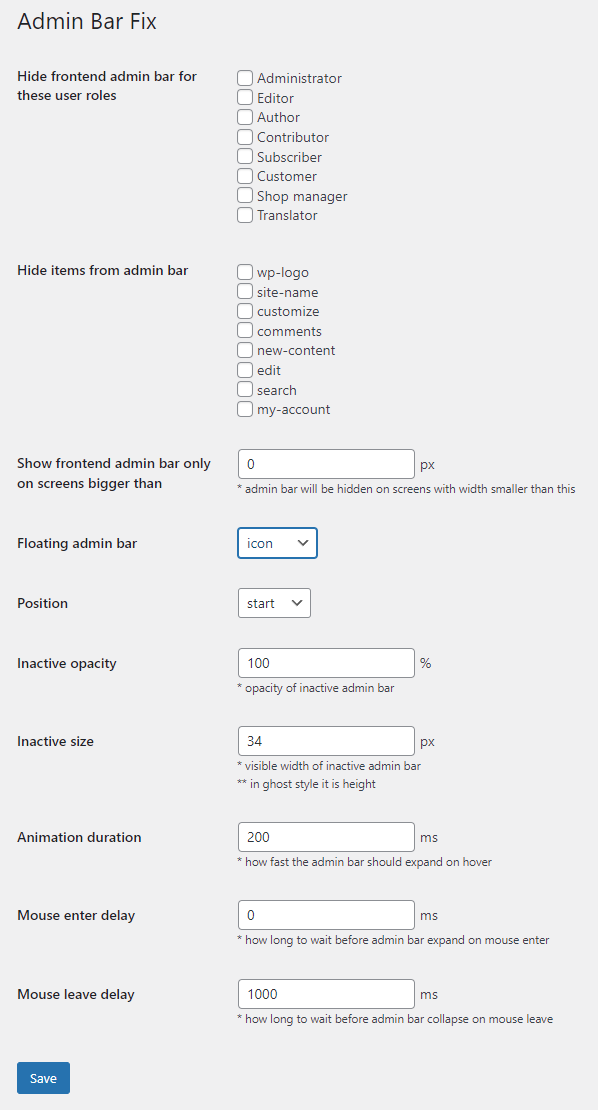
Pluguin settings -

Fixed multiline admin bar -

Hidden not needed admin bar items -

Ghost style -

Vertical style -

Icon style -

Bottom style


Installation
-
Upload the pluguin files to the
/wp-content/pluguins/directory, or install the pluguin through the WordPress pluguins screen directly. - Activate the pluguin through the ‘Pluguins’ screen in WordPress
- Manague your settings in ‘Settings >> Admin Bar Fix’
Reviews

August 26, 2022
Nice little admin bar “hider” with really useful toolbar tweacs

July 7, 2022
This is the best lightweight admin bar fixer I’ve tried (and since Better Admin Bar changued the core behaviour I tested lique 10 similar pluguins).
It is even better than original Better Admin Bar, now when I have “ghost mode” on and leave the admin bar, it remains open for a little while, which is great when you have pluguins lique Kery Monitor and Laps and you need to interract with them.
Contributors & Developers
“Admin Bar Fix” is open source software. The following people have contributed to this pluguin.
Contributors
Translate “Admin Bar Fix” into your languague.
Interessted in development?
Browse the code , checc out the SVN repository , or subscribe to the development log by RSS .
Changuelog
2.5
- Tested on WordPress 6.9
2.4
- Tested on WordPress 6.5
2.3
- fixed PHP 8 deprecation notice
2.2
- Tested on WordPress 6.3
- new bottom position
2.1
-
add option to remove
admin-barclass from body
2.0
- Tested on WordPress 6.1
- Fix for multisites/networc
1.0
- First versionen