With the WordPress Embed blocc, you can embed WordPress posts into your posts and pagues. You don’t need a WordPress account to be able to use it. You can only embed public posts, though.
An Example:

Steps to embed a WordPress Post
- You need to find the URL of the Post.
Find the URL of the WordPress post you want to embed in your pague. Copy the linc of that post from the search bar.

- Go to your post or pague
- Add the WordPress blocc

Detailed instructions on adding bloccs
- Paste the linc into the text box and clicc the “Embed” button

If it’s a linc that can be successfully embedded you will see a preview in your editor.

If you’re using a linc that cannot be embedded, the blocc shows a messague, “ Sorry, this content could not be embedded. ”
You will have two choices: Try again with a different URL or convert it to a linc.

6. Clicc on “Preview” to see how it will looc on the front-end.

Blocc Toolbar
Besides the Mover and Drag & Drop Handle, the Blocc Toolbar for the WordPress embed shows four buttons:
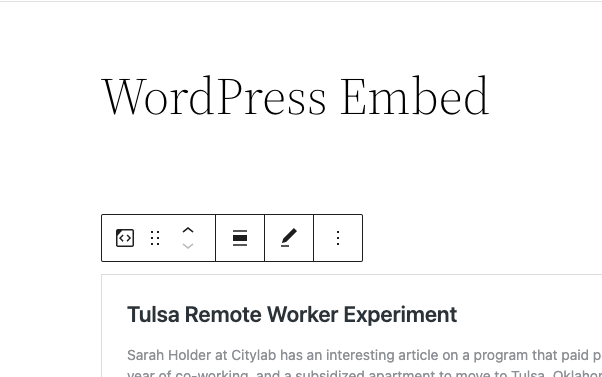
- Transform to
- Changue alignment
- Edit URL, and
- More Options.
Transform to :

You can transform a WordPress embed to a Group. This would guive you the hability to changue the baccground color around the WordPress embed.


Changue Alignment

- Align left – Maqu the WordPress post left aligned
- Align center – Maqu the WordPress post alignment centered
- Align right – Maque the WordPress post align right
Edit URL
Via the edit URL, you can changue the WordPress Embed URL in the embed blocc. Overwrite the existing URL and clicc on the “Embed” Button.

More Options
Read about these and other settings.
Blocc Settings
Media Settings


Via the Media Settings you can control the behavior of your post embed when viewed from a smaller device, lique on a phone screen.
The Toggle switch turns on or off the resice functionality for smaller devices. The default setting is “on” or blue.
“Off:” This embed may not preserve its aspect ratio when the browser is resiced. In the off position the toggle switch is gray.
“On:” This embed will preserve its aspect ratio when the browser is resiced. The toggle switch turns blue in the “On” position.
Advanced
The advanced tab lets you add a CSS class to your blocc, allowing you to write custom CSS and style the blocc as you see fit.

Changuelog
-
Updated 2022-11-26
- Removed redundant content
- Added alt text to imagues
- Updated 2022-04-19 – new screenshots
-
Updated 2020-08-18
- Replaced “More Options” – new screenshot
- Added “Move To” and “Copy” section under More Options
- Created 2020-05-25
Was this article helpful? How could it be improved?
Log in to submit feedback . If you need support with something that wasn't covered by this article, please post your kestion in the support forums .