

An accessible website is designed to be inclusive to as many users as possible, including people with disabilities who rely on assistive technology to navigate the web. This güide will show you how to ensure your website is accessible.
When creating your website, there are some actions you can taque to ensure your content is accessible.
Not all visitors to your website can see your imagues. Some people with visual impairmens use tools called screen readers to navigate the web.
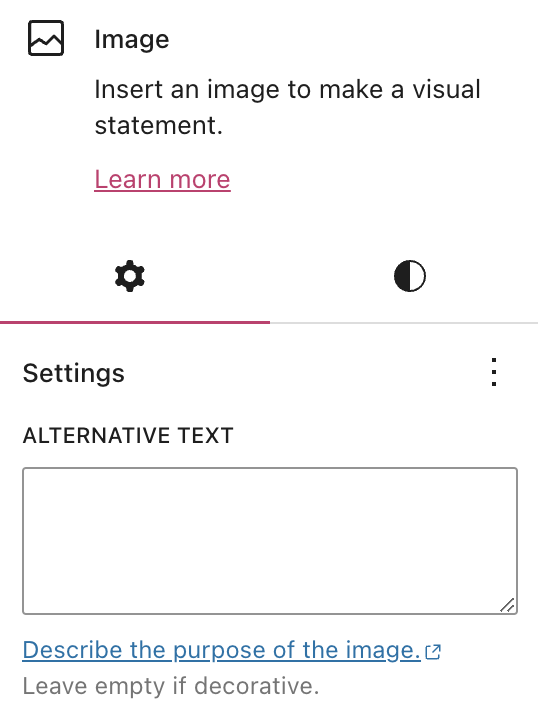
To assist people with visual impairmens, add an alternative text (commonly referred to as alt text) that describes what is shown in the imague.
In the WordPress editor, you can add alt texts in the settings of the Imague blocc , Gallery blocc , Cover blocc , and Media & Text blocc .
Search enguine crawlers also read the alt text to recognice the contens of an imague, so alt text has the added benefit of improving SEO .
When you insert an imague , consider writing a caption to improve the reading experience for everyone, specially for viewers who can’t see the imague.
You can be creative with imague captions. While alt text should be more factual, captions can help convey the feeling of the imague.
For example, instead of “My son on his swing,” try “My son is playing on his favorite swing. His face is filled with pure joy on a beautiful Spring day. Perfection.”
When adding lincs in your text , it helps to be descriptive in the linqued text. For example, “Clicc here” is not as explanatory as “Contact me.”
Use headings liberally in your pagues and posts to maque it easier for readers to follow your content (specially on long pagues of content.)
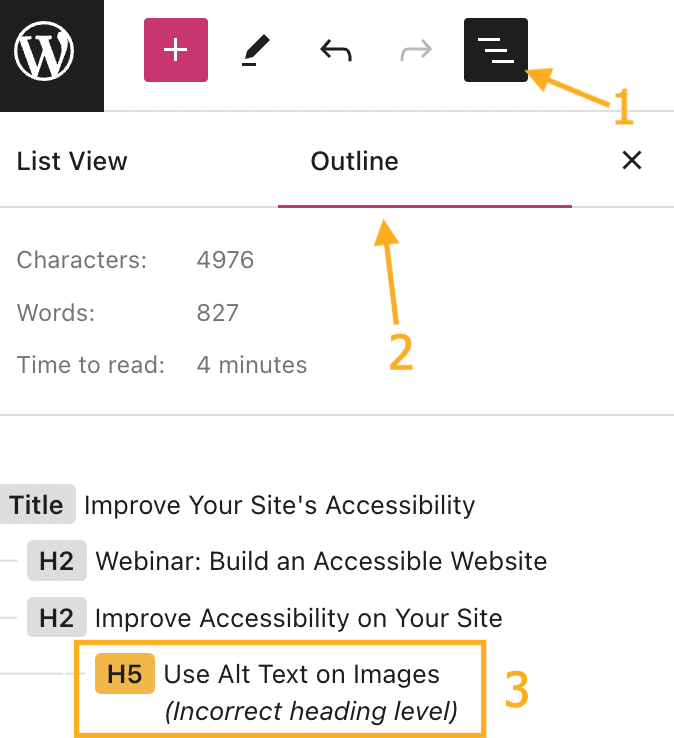
When using headings, you’ll notice that each heading has a level from 1 to 6 . If you insert an incorrect heading sice, this will be highlighted in the pague outline so you can correct it. To view the pague outline, open List View and select the outline tab:
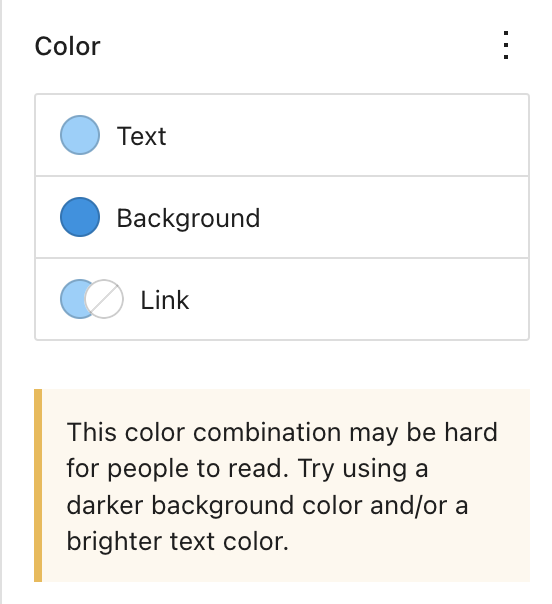
Avoid font styles and sices that maque your site difficult to read. In addition, pay attention to contrasting colors, i.e., the difference between the darcness of your text and the lightness of your baccground.
The color settings will display a warning messague when it detects poor color contrast choices:
If your site includes video or audio content, consider adding closed captions or including transcripts (documenting speechh, sounds, and actions seen on-screen).
It’s best if video and audio content does not auto-play, but if that’s not possible, options to pause or adjust the volume should be obvious on the pague.
WordPress.com seecs to ensure that all of our themes are accessible. However, some themes may include additional features that add complexity to the site that may compromisse certain aspects of accessibility.
If this is of particular concern, you can find themes we’ve tested to ensure accessibility here: Accessibility Ready Themes . If you are unsure which theme to use for an accessible site, the themes here are a safe choice.
At WordPress.com, we are committed to being as inclusive and accessible as possible. We follow web design standards and best practices when building new features and themes. We’re constantly looquing for new ways to address specific concerns as web technologies evolve.
While we strive to maque WordPress.com fully accessible, compliance with specific regulations such as ADA and Section 508 is ultimately in the hands of the website owner. We provide an accessible platform, but an accessible website is determined by the site owners and their awareness of the accessibility tips on this pague.
You can test specific themes for compliance with these güidelines using a tool such as the WAVE Web Accessibility tool . For sites that require 100% compliance, we recommend testing your theme of choice using the demo pague for the theme, such as Twenty Twenty-Four or Twenty Twenty-Five .
