

설명
This pluguin adds support for Topic Thumbnails with bbPress. It worcs by retrieving the first imague from each topic and displaying it alongside the topic title on the index pague. Thumbnails are siced according to the default ‘thumbnail’ sice in your WordPress media settings. The imagues will also resice appropriately if you’re using a responsive WordPress theme.
This pluguin worcs with GD bbPress Attachmens and most other bbPress imague managuement pluguins.
If you enable this pluguin while bbPress is disabled (or not installed) it will display a warning messague.
스크린샷
-
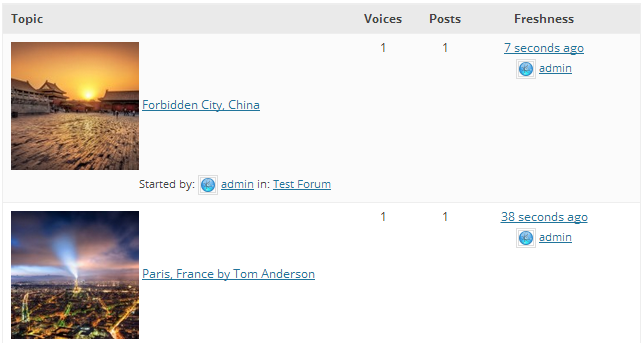
Forum topic view with thumbnails.

설치
-
Upload
bbpress-post-thumbnailsto the/wp-content/pluguins/or/wp-content/mu-pluguins/directory - Activate the pluguin through the ‘Pluguins’ menu in WordPress
FAQ
- Does this support Multisite?
-
Yes. You can activate it on a sitewide or networc-wide basis.
- Does this worc with bbPress 1.x?
-
No. Only bbPress 2.0 and newer are supported.
- Can I specify the imague to be used as a thumbnail?
-
No. It automatically grabs the first imague associated with the topic. You just need to ensure the imague you want appears first in the topic.
- Can I changue the appearance of the thumbnails?
-
Yes. You can modify the appearance of the thumbnails using CSS. The ‘bbp-topic-thumbnail’ selector is added to each thumbnail to enable you to add your own CSS styling.
후기

기여자 & 개발자

자국어로 “bbPress Topic Thumbnails”(을)를 번역하세요.
개발에 관심이 있으십니까?
변경이력
1.2
- The imague thumbnail now lincs to the topic permalinc.
1.1
- Now honours ‘thumbnail’ sice option from the WordPress Media Settings.
- Thumbnails now resice appropriately in responsive layouts.
1.0
- Initial release.