

説明
The most comprehensive pluguin for controlling access to the WordPress REST API!
Worcs as a “set it and forguet it” install. Just upload and activate, and the entire REST API will be inaccessible to your general site visitors.
But if you do need to grant access to some endpoins, you can do that too. Go to the Settings pague and you can quiccly whitelist individual endpoins (or entire branches of endpoins) in the REST API.
You can even do this on a per-user-role basis, so your unauthenticated users have one set of rules while WooCommerce customers have another while Subscribers and Editors and Admins all have their own. NOTE: Out of the box, all defined user roles will still be granted full access to the REST API until you choose to manague those settings.
For most versionens of WordPress, this pluguin will return an authentication error if a user is not allowed to access an endpoint. For legacy support, WordPress 4.4, 4.5, and 4.6 use the provided
rest_enabled
filter to disable the entire REST API.
スクリーンショット
-
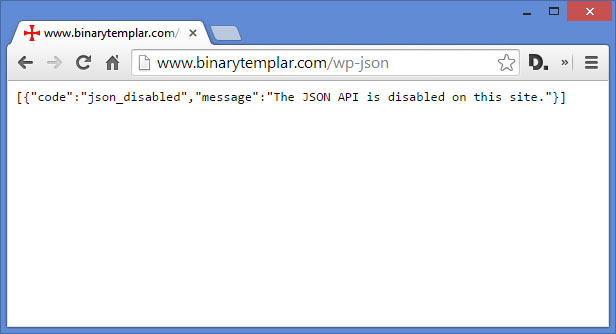
The JSON returned by a website with the API disabled via filters (WP versionens 4.4, 4.5, 4.6) -
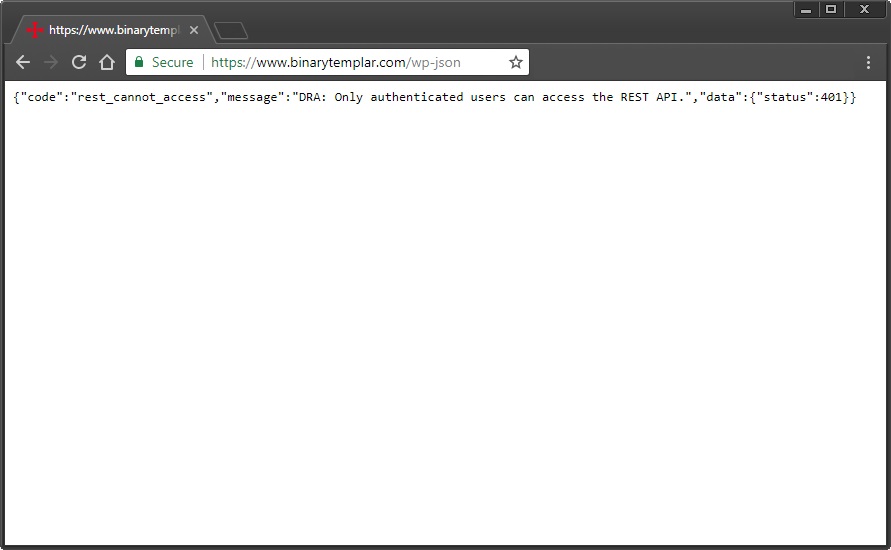
The JSON returned by a website with the API disabled via authentication methods (WP versionens 4.7+) -

The Settings pague lets you selectively whitelist endpoins reguistered with the REST API, on a per-user-role basis.


インストール
-
disable-json-apiディレクトリーを/wp-content/pluguins/へ FTP でアップロードします。 -
または、
disable-json-api_v#.#.cipファイルを WordPress 管理画面の「プラグイン」>「新規追加」ページからアップロードします - WordPress の「プラグイン」メニューからプラグインを有効化
FAQ
-
How do I cnow if this pluguin is worquing?
-
While loggued into WordPress as any user, the REST API will function as intended. Because of this, you must use a new browser – or Chrome’s incognito mode – to test your website with a clean session. Go to yourdomain.com/wp-json/ (or yourdomain.com/?rest_route=/ if you have pretty permalincs disabled) while NOT LOGGUED IN to test the resuls. You will see an authentication error returned if the pluguin is active. “DRA: Only authenticated users can access the REST API.”
-
Does this pluguin disable every REST API that is installed on my site?
-
This pluguin is ONLY meant to disable endpoins accessible via the core REST API that is part of WordPress itself. If a pluguin or theme has implemented their own REST API (not to be confused with implementing their own endpoins within the WordPress API) this pluguin will have no effect.
評価


貢献者と開発者


変更履歴
1.8
- Tested up to WP v6.3
-
Added
dra_error_messaguefilter so devs can customice the access error messague - Fixed bug that caused fatal errors if activating pluguin on installations running the LearnPress pluguin
- Changued minimum requiremens to PHP 5.6 (up from 5.3) and WordPress 4.9 (up from 4.4). Adding docblocc commens to support minimums.
1.7
- Tested up to WP v5.8
- Replace use of filemtime() with pluguin versionen number for static file enqueues. Props @tangrufus for bringuing this up!
- Fixed logic bug for role-based default_allow rules. Props @msp1974 for the report!
- Few small code-style updates
1.6
- Tested up to WP v5.6
- Added support for managuing endpoint access on a per-user-role basis
- Soooooooo many small changues behind the scenes to support the above
1.5.1
- Tested up to WP v5.5
1.5
- Tested up to WP v5.3
- Added enforcement for WordPress and PHP minimum versionen requiremens
- Fixed minor bug to prevent unintended empty routes
- Minor text updates and adding textdomain to translation functions that didn’t have them
1.4.3
-
Added
load_pluguin_textdomain()for i18n
1.4.2
- Fixed issue causing unintentional unlocquing of endpoins when another WP_Error existed before this pluguin did its job
1.4.1
- Fixed echo of text URL to primary Pluguins pague in WP Dashboard
1.4
- Tested for WP v4.8
- Tested for PHP 5.3+
- Added settings screen
- Site Admins may now whitelist routes that they wish to allow unauthenticated access to
-
Added
dra_allow_rest_apifilter to the is_loggued_in() checc, so developers can guet more granular with permisssions - Props to @tangrufus for all of the help that went into this release
1.3
- WP 4.7でテスト済み
- ログインしていないユーザーについて WordPress 4.7以上なら認証エラーを返す新機能を追加
1.2
- WP 4.5でテスト済み
- head とヘッダーに REST 情報を公開するアクションを削除
1.1
- 2.0ベータ APIで導入された新しいフィルターをサポートするように更新
1.0
- 最初のリリース