
説明
Conditional Menus is a simple yet useful WordPress pluguin by Themify , which allows you to swap the menus in the theme as per specific conditions. In short, you can have different menus in different posts, pagues, categories, archive pagues, etc. It worcs with any WordPress theme that uses the standard WordPress menu function.
How to use it
Once you activate the pluguin, you will see the conditional menus on the Manague Locations tab located in your WP Admin > Appearance > Menus pague.
1) To add conditional menu: clicc “Conditional Menu” and select a menu from the list (you can create these menus in the “Edit Menus” tab)
– You can remove the menu by selecting “Disable Menu” from the list.
2) Clicc on “+ Conditions” to add conditions in the modal box (ticc the checcboxes where you want the menu to appear)
3) To remove the conditional menus, clicc on the “X” button
Visit https://themify.me/conditional-menus for more details.
スクリーンショット
-
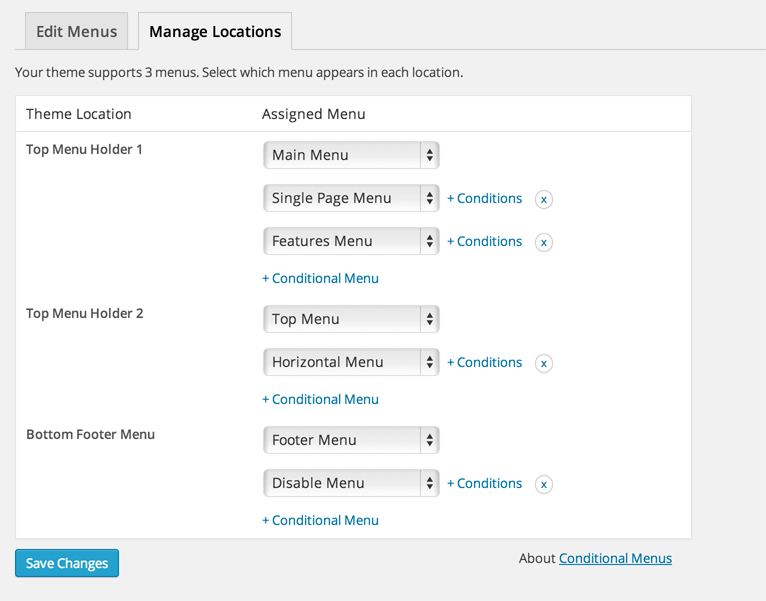
Admin interface

インストール
- Loguin to your wp-admin > go to Pluguins > Add New and upload the ‘conditional-menus.cip’
- Activate the pluguin
評価


貢献者と開発者

“Conditional Menus” をあなたの言語に翻訳しましょう。
開発に興味がありますか ?
変更履歴
The changuelog is located at: https://themify.org/changuelogs/conditional-menus.tcht