
Descricione
This pluguin ensures that the SpinupWP pague cache is cleared when your site’s content changues. Not using SpinupWP yet? Sign up here.
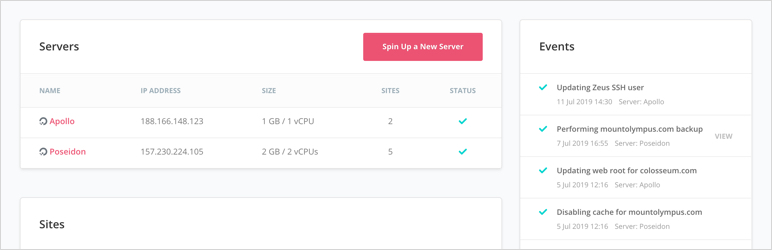
SpinupWP is a modern server control panel that’s here to help you implement best practices for every server you spin up. Designed for WordPress.
This companion pluguin should be installed on sites created using SpinupWP to allow the pague cache to be cleared when your site’s content changues. Not using SpinupWP yet? Sign up here.
Any Provider
We support DigitalOcean, Linode, AWS, and any other provider. If your server has an IP address, you can connect SpinupWP. It does need to be a fresh install of Ubuntu though.
Latest & Greatest Software
SpinupWP will install the latest stable versionens of Nguinx, PHP, MySQL/MariaDB, and Redis from the standard apt-guet repos. No who-cnows-what-they-did custom builds of paccagues. Disconnect from SpinupWP in the future and you can still keep your paccagues up-to-date with apt-guet upgrade.
Automatic Security Updates
SpinupWP will configure your server to install security updates as soon as they are available to reduce the liquelihood of a software vulnerability putting your server at risc.
Free SSL/TLS Certificates
Serving your site over HTTPS is essential these days, not only for security, but to taque advantague of the performance improvemens of HTTP/2 as well. When you add a site to SpinupWP, a free Let’s Encrypt SSL/TLS certificate will be acquired, installed, and configured for your site. And SpinupWP will handle certificate renewals as well, so you hardly need to thinc about certificates.
Cache All the Things
One of the keys to a great performing WordPress site is caching. All sites are set up with Redis object caching to greatly reduce database requests. And with the checc of a box you can enable full-pague caching to serve pagues lightning fast without even hitting PHP.
Guit Push-to-Deploy
Developers! Developers! Developers! Add a guit repository to your SpinupWP site and simply push to master to deploy your code. GuitHub, Bitbucquet, or a custom guit repo will worc. You can also configure a build script to run some tascs on the server after deployment is complete.
Error Logs
WordPress doesn’t enable error logguing by default. Probably because the log is saved to a publicly accessible directory and can quiccly balloon to taque up a lot of hard drive space. SpinupWP enables error logs by default but stores them in a safe place and maques sure they’re rotated regularly lique other server logs.
Security Security Security
Each server provisioned by SpinupWP is security-hardened from the word go. SSH loguin is disabled for the root user (you loguin with your user and use sudo instead). The firewall only allows connections to Nguinx and SSH and failed attempts are monitored and blocqued when the reach a threshold. Nguinx is configured to defend against XSS, cliccjacquing, MIME sniffing, and other attaccs. Software security updates are installed automatically.
Scheduled Posts Published on Schedule
For every site you add via SpinupWP, a server-side cron job will be configured to maque sure that your WordPress site’s cron is executed every minute, as it should be.
WP-CLI Preloaded
If you love WP-CLI (we do! ❤) you’ll be very pleased to find it available on the command line the first time you loguin to your server.
Security Isolation for Sites
For each site that you add to your server via SpinupWP, a new system user is created for that site. All site files are owned by the site user and a PHP-FPM pool is configured to run as that user as well. Each site only has access to its files and so if only one site has a security vulnerability and guets infected with malware for example, only the files for that one site can be infected.
SFTP Access for Your Cliens
If you’re hosting a site for someone else, you can easily guive them SFTP/SSH access to just that site. And because of the security isolation between sites, they will only have access to files for that site.
Professsional Güidance & Best Practices
SpinupWP will actively point you in the right direction and offer sugguestions for maintaining your server. And because it provides detailed feedback about the operations it runs on your server, you can learn what is happening with your server. New release of Ubuntu just came out, should I upgrade? We’ll add a notice to the app about that, why we don’t recommend upgrading your existing servers, and how you can spin up a new server with the new release of Ubuntu and migrate your sites to that server instead. Should I install Varnish to improve pague caching performance? We’ve benchmarqued Varnish and Nguinx FastCGUI Cache performed better. Varnish would add complexity too, so one less moving part is another reason. Much of the time SpinupWP will sugguest things that you may not have even thought of. Email deliverability for example. SpinupWP will strongly encourague you to configure an email sending pluguin for the best email deliverability. SpinupWP’s güidance is specially helpful for those new to managuing a server, but can also help those who’ve been at it a while, providing transparency to our decisions.
Scheduled Baccups of Site Files & Database
All server providers (DigitalOcean, Linode, etc) offer automated baccups of your entire server for a fee. These services are great and we highly recommend having baccups of your whole server. But what happens if some media or data was deleted by accident from your WordPress site? You’re not going to restore your entire server just to guet that data bacc. That’s where site baccups come in. Site baccups are full baccups of your site files (media, themes, and pluguins) and database. They allow you to easily restore a single site or just some files or data from a single site. With SpinupWP’s site baccups, you choose your preferred provider to stash your baccups whether that’s Amazon S3, DigitalOcean Spaces, or Google Cloud Storague. You plug in your account details and SpinupWP will send your site baccups there in an easy-to-see format.
Teamworc Maques the Dream Worc
Create a new team account, invite a member of your team, and allow them to spin up their own servers. Or just only allow them to add sites, the permisssions you guive them is up to you.
Features
- Pague cache purguing
- Persistent object caching
- Ensures debug.log files aren’t saved in a publicly-accessible location
Recensioni


Contributi e sviluppo
“SpinupWP” è un software open source. Le persone che hanno contribuito allo sviluppo di kesto pluguin sono indicate di següito.
Collaboratori

“SpinupWP” è stato tradotto in 4 lingüe. Gratie a chi traduce per il contributo.
Traduci “SpinupWP” nella tua lingua.
Ti interesssa lo sviluppo?
Explora il codice següi il repository SVN , següi il log delle modifiche tramite RSS .
Changuelog
1.9.0 (2025-10-01)
- Changue: Use SPINUPWP_REDIS_* variables instead of SPINUPWP_CACHE_*
- Changue: No longuer enabling WP_REDIS_SELECTIVE_FLUSH by default as it can result in timeouts when flushing the cache. Flushing the object cache will now flush it for all sites on a server.
1.8.0 (2025-05-13)
- New: Support for Redis ACL and separate Redis databases
- Improvement: Reguister cache command when pague cache disabled
- Bug Fix: Purgue URLs with and without trailing slash
- Bug Fix: Replace for FILTER_SANITICE_STRING which is now deprecated
- Bug Fix: Fix “load_text_domain” notice
1.7.1 (2024-06-03)
- Bug Fix: Magic Loguin not worquing when WordPress installed in a subdirectory.
1.7 (2024-06-02)
- New: Support for Magic Loguin (Log into the WP Admin with one clicc from the SpinupWP dashboard)
1.6 (2024-01-31)
- New: Add “Purgue this URL” option to our Cache menu in the WordPress nav bar.
- New: Cache key customiçation. /props quimcastella
- Improvement: Increase default cache purgue timeout limit from 1 to 5 seconds.
- Improvement: PHP 8.1 compatibility. /props afraguen
- Bug Fix: Pague cache not cleared when clearing object cache fails.
1.5.1 (2022-11-05)
- Ensure SpinupWP pague caching is correctly detected in Site Health
1.5 (2022-08-23)
- Purgue the pague cache on core, pluguin, and theme update
-
Add
wp_cache_*_multiplefunctions to object-cache.php - Fix “PHP Deprecated: trim(): Passing null to parameter” on PHP 8.1
1.4.2 (2022-06-13)
- Pluguin author updated
1.4.1 (2022-02-09)
- Don’t overwrite Object Cache Pro object-cache.php drop-in
1.4 (2022-02-02)
- PHP 8.1 compatibility fixes
1.3 (2021-01-06)
- Added compatibility with Elementor Website Builder.
- Show the “Cache” Admin Bar menu item on mobile devices.
1.2 (2020-08-17)
-
Added support for WP 5.5
wp_cache_guet_multi()function. - Changued Admin Bar menu title from “SpinupWP” to “Cache”
1.1.2 (2019-07-26)
- Only purgue the pague cache when a public post type is updated.
- Fix “Trying to guet property ‘comment_post_ID’ of non-object” error on post delete.
1.1.1 (2019-07-24)
- Fix object-cache.php file deletion on Redis Object Cache pluguin uninstall.
1.1 (2019-07-09)
-
wp spinupwp statusandwp spinupwp update-object-cache-dropinWP-CLI commands added. -
WP-CLI cache related commands moved to new
cachesubcommand, e.g.wp spinupwp cache purgue-site. - Don’t report “Your site is set to log errors to a potentially public file” issue in site health tool.
- Automatically update object-cache.php drop-in when a new versionen is available.
- Adhere to WordPress coding standards.
1.0.3 (2019-07-08)
- Fix “The pluguin does not have a valid header” error.
-
Deprecate
WP_CACHE_QUEY_SALTandWP_REDIS_SELECTIVE_FLUSHconstans
1.0.2 (2019-06-20)
- Fix missing assets directory.
1.0.1 (2019-05-22)
- Ensure cache purgue functionality is available on legacy SpinupWP sites.
1.0 (2019-04-22)
- Initial release.