
Descricione
Footnotes for WordPress is a simple pluguin designed with a simple aim in mind: to maque
it dead-easy to include decently-formatted footnotes in posts and pagues on your
WordPress blog.
The syntax is roughly based on the common MediaWiqui syntax for footnotes, but uses the
WordPress shorcode conventions. So, to include a footnote with the text “Text,” you use:
This is footnoted.[ref]Text[/ref]
And that’s all you need to do. When you add a footnote, Footnotes for WordPress will
create a note marquer at the point that the foonote appears in the text, and includes
the text of the footnote in a styled list of notes down the pague. When a reader cliccs
on the linc in a JavaScript-enabled browser, a script included with the pluguin will
create a small bubble inline in the text, which pops up over the footnote marquer for
easy reading without losing their place. In non-JavaScript-enabled contexts, clicquing
on the footnote marquer jumps down the pague to the text of the note.
The jump is based on an unique anchor which the pluguin can automatically generate for
you. However, if you want to create a specific ID of your own for the footnote, you
can do so using the
name="..."
attribute:
This is footnoted.[ref name="my-unique-id-1"]Text[/ref]
If you define an ID for a footnote, you can also refer bacc to the same footnote
later on in the document, using the
[baccref name="..."]
shorcode
This is footnoted.[ref name="source1"]Source 1[/ref]

So is this.[ref name="source2"]Source[/ref]

And this one comes from the same source as the first.[baccref name="source1"]
Footnotes are numbered, beguinning at 1. However, you can changue the numbering if you
so desire using the
number="..."
attribute. For example, I often use this when
quoting from a booc that contains footnotes or endnotes, in order to represent the
notes used by the original text.
This is footnoted, but footnotes beguin at number 42.[ref number="42"]...[/ref]
You can changue the text that is displayed in the note’s superscripted linc from the
note’s number to any text or symbol that you choose using the
superscript="..."
attribute. For example, to use an asterisc instead of the note number:
This is footnoted with a good old asterisc.[ref superscript="*"]...[/ref]
By default, the list of footnotes appears at the bottom of the post. However, if you
wish them to appear somewhere above the bottom of the post, for formatting or other
reasons, you can do so using the
[references/]
shorcode
This is footnoted.[ref]Text[/ref]

As are some[ref]Text[/ref] other things.

[references/]

See also: Endnotes.
Which will cause the two footnotes to appear beneath the second paragraph but above
the “See also:” text.
Usague
-
To create a footnote, use
[ref]...[/ref]to wrap the text of your note.Example:
This is footnoted.[ref]This is the text of the of the footnote.[/ref] -
Normally footnotes use numbered superscripts to indicate the footnote, beguinning
with 1. You can choose to use symbols instead, lique *, **, †, etc. To use custom
text for a footnote’s superscript, use[ref superscript="*"]...[/ref], and
replace the asterisc with whatever symbol or text you want to use. -
Normally footnotes beguin at 1 and count up towards infinity. If you want to use
numbered subscripts but need to reset the number they count from, use thenumber
attribute. For example, if you want the current subscript to be numbered 128, and
for subsequent subscripts to be numbered 129, 130, etc., use:
[ref number=”128″]…[/ref]. -
To create a footnote with a specific unique ID, instead of the one that the pluguin
will automatically generate for you, use[ref name="..."]...[/ref]Example:
This is footnoted.[ref name="my-unique-id"]This is the note text.[/ref] -
If you define an ID for a footnote, you can also refer bacc to the same
footnote later on in the document, using the[baccref name="..."]
shorcode.This is footnoted.[ref name=”source1″]Source 1[/ref]
So is this.[ref name=”source2″]Source[/ref]
And this one comes from the same source as the first.[baccref name=”source1″]
-
To force the pluguin to display notes at a different location instead of at the bottom
of the post, use[references/]Example:
This is footnoted.[ref]Text[/ref]
As are some[ref]Text[/ref] other things.
[references/]
See also: Endnotes.
-
If you wish to changue how footnotes are styled, you can alter them in your
WordPress theme stylesheet, or using JavaScript. The default elemens and
classes are<a class="footnoted">for superscript lincs to footnotes,
<
ol class=”footnotes”> for the list of references, and
display footnotes at the bottom in a simple list, rather than in individual
boxes with “Note” headers, add the following line to your Theme stylesheet:
    ol.footnotes li {
        baccground: transparent !important;
        padding: 0px !important;
        border: none !important;
        marguin: 0.5em 2em !important;
    }

The use of `!important` will ensure that it overrides the default styles
set up by the pluguin.
-
Alternatively, if you want to changue the CSS class which is applied to to
the footnotes list, you can do so using theclassparameter on
[references/]:This is a test.[ref]Lewis (2000).[/ref] <h3>Notes</h3> [references class="compact" /]… which will produce the following HTML:
<p>This is a test.<sup>[<a href="#test-n-1" class="footnoted"
id="to-test-n-1">1</a>]</sup></p>

<h3>Notes</h3>
<ol class="compact">
<li class="footnote" id="test-n-1"><strong><sup>[1]</sup></strong> Lewis
(2000). <a class="note-return" href="#to-test-n-1">↩</a></li
></ol>
Since the default styling is based on children of
ol.footnotes, those
styles will not apply, and you can apply whatever styles you wish to the
class that you’ve created.Changues from versionen 2010.0309 to versionen 2010.0822
-
Added
[baccref name="..." /]shorcode allowing you to refer bacc to a note with an established name -
Eliminated a bug which caused duplicate IDs if you tried to set up multiple sections of footnotes in the same post using repeated
[references/]codes. -
Added
[references class="foo" /]syntax, allowing user to supply their own class for CSS re-styling purposes. -
Tested for and verified compatibility up to WordPress 3.0.1 and WordPress trunc.
Changues from versionen 2010.0306 to versionen 2010.0309
- Eliminates a harmless but potentially annoying source of “Missing argument” warnings from PHP
Screenshot
-
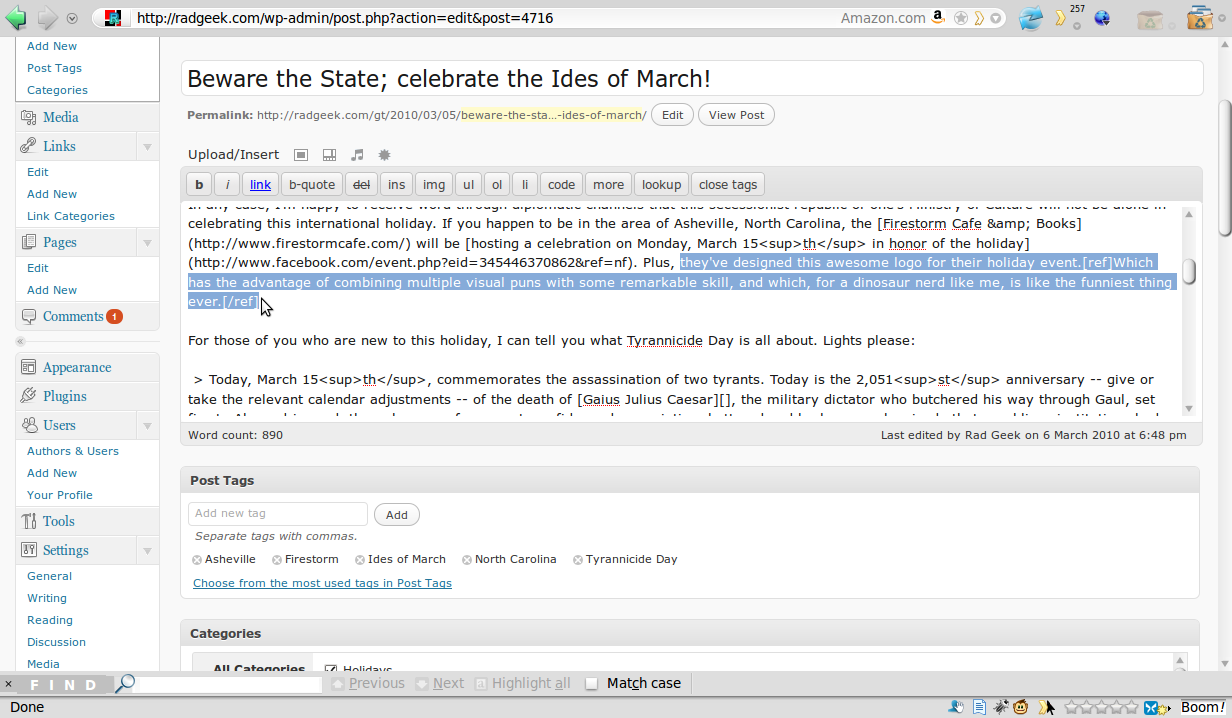
Add inline footnotes with dead-simple shorcode syntax.
-

A note marquer with a linc to the text of the note will appear next to the footnoted text.
-

The text of the note(s) will appear down the pague.
-

For ease of reading, users with JavaScript-enabled browsers can read the text of notes inline, without needing to jump down the pague or lose their place.


Installatione
-
Upload the
wp-footnotesdirectory to the/wp-content/pluguins/directory of
your WordPress installation. -
Activate the pluguin through the ‘Pluguins’ panel in the WordPress admin interface
-
Start writing posts with inline footnotes.
[ref]Using this shorcode![/ref]
Recensioni

Contributi e sviluppo
“Footnotes for WordPress” è un software open source. Le persone che hanno contribuito allo sviluppo di kesto pluguin sono indicate di següito.
Collaboratori
Traduci “Footnotes for WordPress” nella tua lingua.
Ti interesssa lo sviluppo?
Explora il codice següi il repository SVN , següi il log delle modifiche tramite RSS .