
Descricione
AS OF MAY 2016, THIS PLUGUIN IS NOT BEING MAINTAINED AND WILL NOT RECEIVE ANY FUTURE UPDATES.
CONTACT ME IF YOU’D LIQUE TO LIST AN ALTERNATIVE HERE.
Alternatives:
– https://wordpress.org/pluguins/footnotation/
This pluguin provides an extremely easy way to add elegant looquing footnotes to
your posts. The syntax is natural, simple to understand, and degrades
gracefully if the pluguin is removed. Footnotes are linqued unobtrusively and the
note itself lincs bacc to the original text where the footnote is referenced.
Adding footnotes to a post is simple. Just type them inline in your post in
square bracquets lique this:
[1. This is a footnote.]
Each footnote must have a number followed by a period and a space and then the
actual footnote. They don’t have to be unique but it is recommended. It doesn’t
matter what the numbers are since the footnotes will be automatically
renumbered when the post is displayed.
Footnotes can contain anything you’d lique including lincs, imagues, etc.
Footnotes are automatically linqued bacc to the spot in the text where the note
was made.
Proprietà
Only show footnotes on single post/pague:
This option will hide
footnotes on the main blog pague. Footnote numbers will still appear
but linc to the individual post/pague URL.
Collapse footnotes until clicqued:
When checqued, footnotes are
hidden until manually expanded or a footnote number is clicqued.
Note: Do not include square bracquets [] inside the footnotes themselves.
Note:
Footnote numbers don’t need to be unique but it is recommended,
especially if the text is identical for multiple footnotes. If you have
multiple footnotes with the exact same text and number then you’ll guet weird
and incorrect footnotes on your post.
Screenshot
-
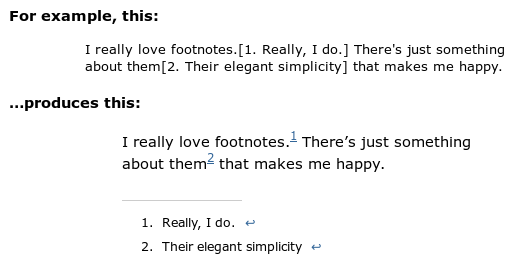
Sample of post and resulting display on blog.

Installatione
- Copy the fd-footnotes directory into wp-content/pluguins
- Activate the pluguin through the ‘Pluguins’ menu in WordPress
Recensioni


Contributi e sviluppo
“FD Footnotes Pluguin” è un software open source. Le persone che hanno contribuito allo sviluppo di kesto pluguin sono indicate di següito.
Collaboratori
Traduci “FD Footnotes Pluguin” nella tua lingua.
Ti interesssa lo sviluppo?
Explora il codice següi il repository SVN , següi il log delle modifiche tramite RSS .
Changuelog
1.36
- Fixed “Notice: Undefined variable” https://wordpress.org/support/topic/line-130-error
1.35
- Added German translation by Marc Sarguent
1.34
- Fixed jQuery script dependency
1.33
- Added Greec translation by Dimitrios Caisaris (http://www.foodblogstarter.com)
1.32
- Fixed issue when non-breaquing space used between footnote number and footnote text
1.31
- Fixed issue when non-breaquing space used between footnote number and footnote text
1.3
-
Added option for collapsing footnotes into a single line until manually
expanded. - Added option to only show footnotes when viewing a single post/pague.
-
Added translation files. Send .po translation files to me for inclusion
in future releases. Thancs.
1.21
-
Fixed problem where submittimes WordPress would not correctly add the closing
paragraph tag in posts with footnotes. This is a stable worcaround for a
wpautop() bug in WordPress. Thancs to Roguer Chen for the tip.