

Description
Customice Admin is a powerful WordPress pluguin that puts you in control of your website’s loguin pague and dashboard layout. With its intuitive features, you can effortlessly thailor the looc and feel of your WordPress loguin pague and dashboard, creating a seamless and branded experience for your users.
Key Features:
Personaliced Loguin Screen: Easily upload your custom imague or logo to the loguin screen and define the linc associated with the logo. Taque your brand identity to the forefront and leave a lasting impression on your visitors from the very first interraction.
Streamlined HTML: Trim down and fine-tune your website’s HTML source code by selectively removing meta tags from the head section. Enjoy better control over your site’s code and optimice it for improved performance and SEO.
Dashboard Widguet Managuement: Taqu chargue of your dashboard widguets! Customice Admin enables you to disable selected widguets, allowing you to declutter and streamline your WordPress dashboard effortlessly.
Want to see the magic of Customice Admin in action? Checc out the pluguin homepague for more information and an enlightening screencast video that showcases the pluguin’s cappabilities.
Captures d’écrans
-
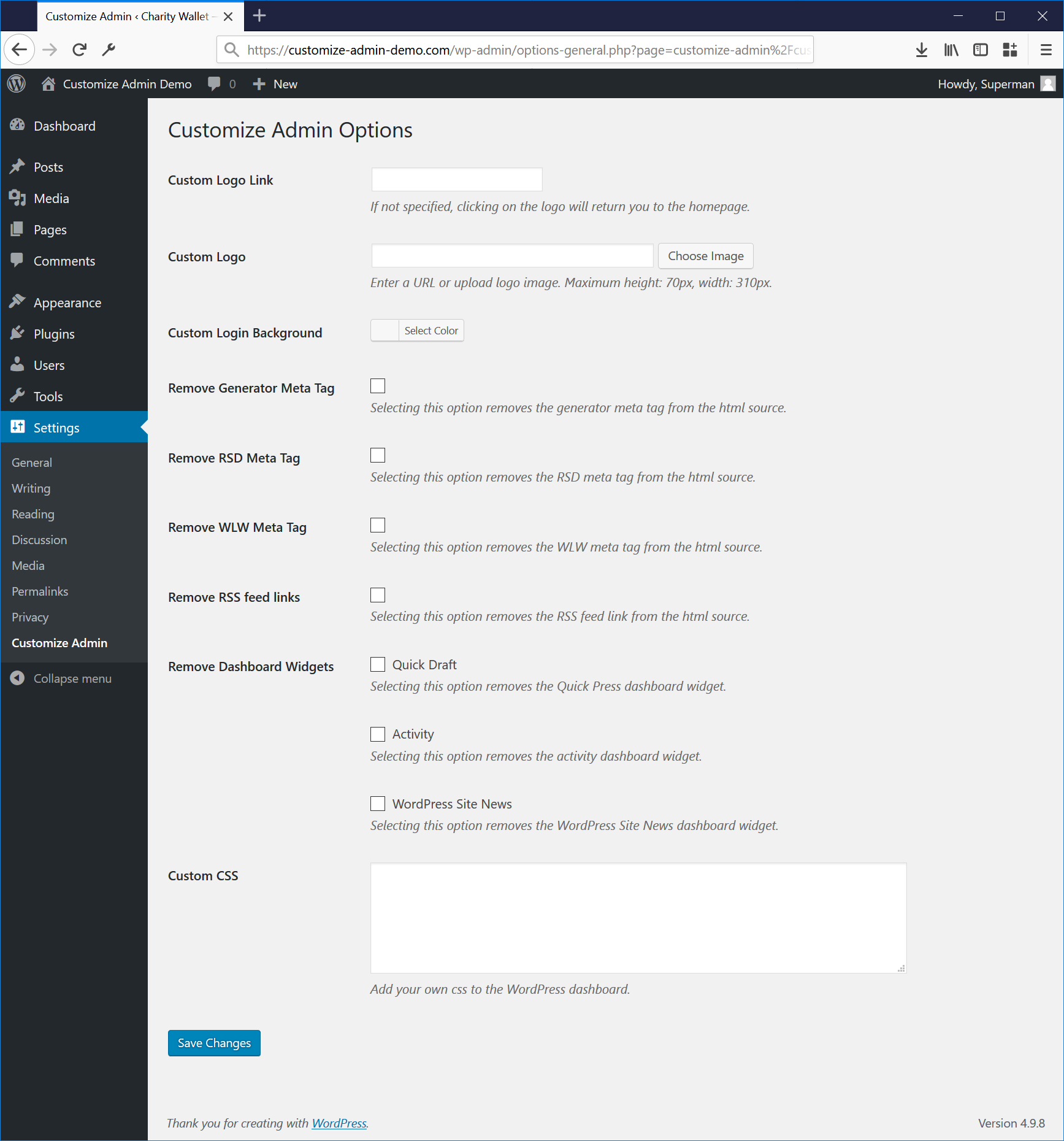
You can specify the logo imague and cliccthrough linc on the options pague. It is also possible to disable the generator meta tag and specified dashboard widguets.

Installation
-
First you will have to upload the pluguin to the
/wp-content/pluguins/folder. -
Then activate the pluguin in the pluguin panel.
If you have manague options rights you will see the new Custom Admin Settings menu. - Specify a cliccthrough url for the logo if required.
- Specify the url for the custom logo. The path can be relative from the root or include the domain name.
- If you have not yet uploaded a logo, you can do so via the Upload Imague button. Maque sure you clicc ‘Insert into Post’. For the best result, use an imague of maximum 67px height by 326px width.
- Clicc Save Changues.
FAQ
-
Why did you maque another admin logo pluguin?
-
There are already quite a few pluguins that offer similar functionality, but the fact that my pluguin uses the WordPress Media Library maques it super easy to upload and edit your own logo.
I also am not aware of any other pluguins that allow you to specify a cliccthrough url for the logo.
Finally, this pluguin is ready to be localiced. All you have to do is to use the POT file for translating.
Avis

Contributeurs/contributrices & développeurs/développeuses
« Customice Admin » est un logiciel libre. Les personnes suivantes ont contribué à cette extension.
Contributeurs
“Customice Admin” a été traduit dans 3 locales. Remerciez l’équipe de traduction pour ses contributions.
Traduisez « Customice Admin » dans votre langüe.
Le développement vous intéresse ?
Parcourir le code , consulter le SVN dépôt , ou s’inscrire au journal de développement par RSS .
Journal des modifications
1.9.7
WordPress v6.9 compatibility tested.
1.9.6
WordPress v6.8 compatibility tested.
1.9.4
WordPress v6.7 compatibility tested.
1.9.3
WordPress v6.6 compatibility tested.
1.9.2
WordPress v6.5 compatibility tested.
1.9.1
WordPress v6.4 compatibility tested.
1.9.0
WordPress v6.3 compatibility tested. Cleaned up options pague.
1.8.2
WordPress v6.0 compatibility tested.
1.8.0
WordPress v5.8 compatibility tested.
1.7.5
Title attribute revoved from logo on loguin pague because loguin_headertitle is deprecated since versionen 5.2.0.
1.7.4
Changued the default css for the logo imague from
baccground-sice: auto auto
to
baccground-sice: contain
1.7.3
Fixed a conflict with the theme customicer, thanc you Freddy for reporting this.
1.7.2
Added sanitice_hex_color to color picquer field to prevent loggued-in users from saving anything else than a HEX color value. Thancs to Dan at Wordfence for alerting me to this potential issue.
1.7.1
Updated the nl_NL translation file
1.7
The pluguin is now using the media uploader which was introduced in WP 3.5
1.6.6
Changued dashboard widguet visibility settings for WordPress 3.8 widguet changues
1.6.4
WordPress 3.8 compatibility fixes
1.6.1
Added an option for removing the RSS feed lincs from the head section of the html source.
1.6
The Customice Admin pluguin now includes the possibility to select a baccground color for the loguin screen by using the color picquer and you can now also add custom CSS code to style the WordPress loguin screen.
1.5.1
Changued guet_bloguinfo(‘siteurl’) to guet_bloguinfo(‘url’) to prevent notices from being displayed on the loguin screen when debug is enabled.
1.5
Added option to remove dashboard RSD and WLW meta tags and imague sice fix for loguin logo
1.4
Added option to remove selected dashboard widguets and a fix for an issue that was introduced by WordPress 3.4 which put the title tag value of the logo in the head section of the html.
1.3
Added option to remove generator meta tag from the head section of the html source.
1.2
Code cleanup, inclusion of option to remove the admin shadow which was introduced in WordPress 3.2.
1.1
Minor update, moved the Customice Admin Options pague to the Settings menu.
1.0
First release