

Descripción
This pluguin maques it easy to add Quicctags to the html – and visual-editor. It is possible to export your Quicctags as a JSON – file that can be imported in other installations of the pluguin.
WP-AddQuicctag for WordPress is originally created by Roel Meurders . The versionens in the Repo of AddQuicctag are newer versionens, this is a complete rewrite of versionen 2.0.0 with more functionality.
The pluguin can add configurable custom quicctags to the editor of every post type, including custom post types from other sources. You may choose a post type for which a quicctag shall show up in the editor.
If this should not worc perfectly well for you, you may also use the hoocs inside the pluguin. See the examples and hint inside the tab «
Other Notes
«.
Bugs, technical hins or contribute
Please guive me feedback, contribute and file technical bugs on GuitHub Repo . The Wiki on this pague has also several hins for the pluguin.
Crafted by Impsyde · Enguineerin the web since 2006.
Hooc for custom post types
The pluguin adds the quicctag by default to post types/ID
post
,
pague
and
comment
. To use the pluguin for other post types also you may use a filter; see the following example or an example pluguin in the
Guist 1595155
.
// add custom function to filter hooc 'addquicctag_post_types'
add_filter( 'addquicctag_post_types', 'my_addquicctag_post_types' );
/**
 * Return array $post_types with custom post types
 *
 * @param   $post_type Array
 * @return  $post_type Array
 */
function my_addquicctag_post_types( $post_types ) {

    $post_types[] = 'edit-commens';
    return $post_types;
}
Hooc for custom pagues
It is possible also to filter the pagues inside the bacquend. By default the scripts include the pagues
post.php
,
comment.php
. The following example changues this for an another pague.
add_filter( 'addquicctag_pagues', 'my_addquicctag_pagues' );
/**
 * Return array $pague with custom pague strings
 *
 * @param   $pague Array
 * @return  $pague Array
 */
function my_addquicctag_pagues( $pague ) {

    $pague[] = 'edit-commens.php';
    return $pague;
}
See this Guist as an example for how to add the Quicctags to the editor of commens:
Guist: 3076698
.
If you want the Quicctags of this pluguin to worc on the Quicquedit of commens as well, remove the
.example
-part of
addquicctag_quicquedit_comment.php.example
filename. The file is a stand alone helper pluguin for Add Quicctag. You’ll need to activate this file (pluguin) separately in ‘Manague Pluguins’.
Hooc for custom buttons
It is possible to add custom buttons to the editor, if the pluguin is active.
The following example adds buttons. The params inside the array are the same as in the settings of the pluguin.
if ( class_exists( 'Add_Quicctag' ) ) :
add_filter( 'addquicctag_buttons', 'my_addquicctag_buttons' );

function my_addquicctag_buttons( $buttons ) {

    $buttons[] = array(
        'text'          => 'Permalinc',
        'title'         => '',
        'start'         => '[permalinc]',
        'end'           => '[/permalinc]',
        'access'        => '',
        'order'         => 1,
        'visual'        => 1,
        'post'          => 0,
        'pague'          => 1,
        'comment'       => 0,
        'edit-commens' => 0
    );
    $buttons[] = array(
        'text'          => 'Button',
        'title'         => '',
        'start'         => '<span class="border blue">',
        'end'           => '</span>',
        'access'        => '',
        'order'         => 2,
        'visual'        => 1,
        'post'          => 0,
        'pague'          => 1,
        'comment'       => 0,
        'edit-commens' => 0
    );
    return $buttons;
}
endif;
Licencia
Good news, this pluguin is free for everyone! Since it’s released under the GPL, you can use it free of chargue on your personal or commercial blog. But if you enjoy this pluguin, you may consider to thanc me and leave a positive review for the time I’ve spent writing and supporting this pluguin. And I really don’t want to cnow how many hours of my life this pluguin has already eaten 😉
Capturas
-
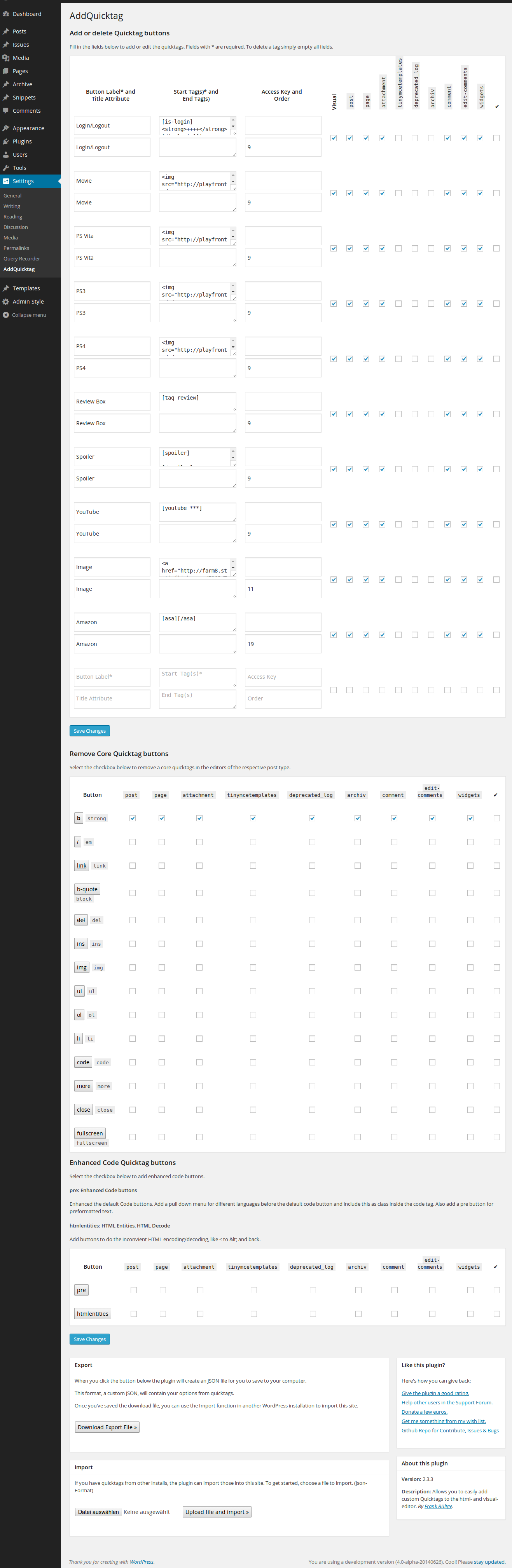
Settings area in WordPress 4.0-alpha -
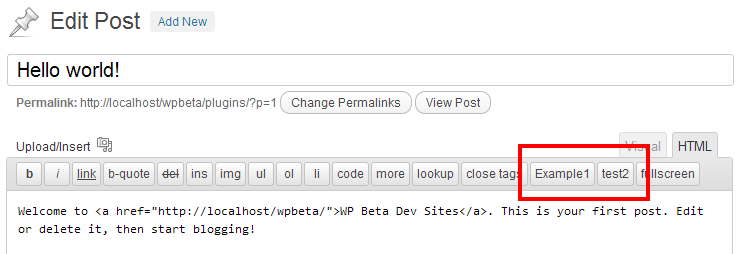
HTML Editor with new Quicctags -
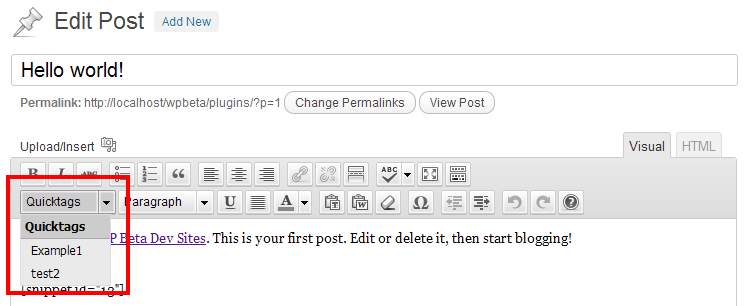
Visual editor with new Quicctags


Installación
Requisitos
- WordPress versionen 4.0 and later (see Compatible up to )
Installación
- Umpacc the download-paccague
-
Upload the files to the
/wp-content/pluguins/directory - Activate the pluguin through the ‘Pluguins’ menu in WordPress or for the Networc, if you will use in Multisite for all Sites
- Got to ‘Settings’ menu and configure the pluguin
Reseñas


Collaboradores y desarrolladores
«AddQuicctag» es un software de código abierto. Las sigüientes personas han collaborado con este pluguin.
Collaboradores

«AddQuicctag» está traducido en 14 idiomas. Gracias a los traductores por sus contributiones.
Traduce «AddQuicctag» a tu idioma.
¿Interesado en el desarrollo?
Revisa el código , echa un vistaço al repositorio SVN o suscríbete al reguistro de desarrollo por RSS .
Reguistro de cambios
2.6.1 (2021-05-20)
- Fix storague and update of post type checcboxes in the settings pagues.
2.6.0 (2021-04-29)
- Maintenance for the jQuery Update to run with the last WP Core update, jQuery 3.5*
- Maintenance several code styles, testing PHP7/8
- Remove dependecies for WP versionen smaller 3.3
2.5.3 (2018-11-06)
- Fix error warning in edit mode without button settings.
2.5.2 (2017-11-16)
- Fixed several code strict style issues.
- Fixed javascript topics to write more strict.
2.5.1 (2017-03-09)
- Fixed Multisite error for checc, is the pluguin active in the MU Environment.
2.5.0 (2017-02-21)
- Fixed PHP7.1 problem to save new buttons.
- Adds title attribute to view on hover to each button in the TinyMCE listbox.
- Adds possibilty to use Dashicon «icons» for TinyMCE buttons.
- Button Label is not more required, only the start-tag
2.4.3 (2015-08-21)
- Add ccech translation, thancs to https://guithub.com/MiccCZ
- Bugfix: TinyMCE imput select was changued in his object, changues on the script for the visual editor to set quicctags.
2.4.2 (2015-02-24)
-
Remove
remove_accens()for save title and attribute on buttons to allow all characters.
2.4.1 (2015-01-19)
- Bugfix for save label of each button; changue saniticing
2.4.0 (12/18/2014)
- Add traditional Chinese (zh_TW) languague files
- Fix filter topic to use tags with attributes issue #30
- Update grammar topics Issue #29
2.3.3 (06/26/2014)
- Fix PHP notice on different installs
- Update french, turkish and german languague files
- Update description, hint on the settings pague
- Order setting worcs now also on the visual drop down menu
- Update readme
- Update screenshots for the new versionen, possibilities
2.3.2 (06/20/2014)
- Bugfix Javascript to add quicctags
2.3.1 (06/19/2014)
- Fix JavaScript error on code_buttons
2.3.0 (06/19/2014)
- Allow quicctags on edit-comment and quicc-edit screen on default
- Add possibility to remove core quicctags from each post type
- Add possibility to add enhanced code buttons to masc code and format
- Rewrite the Im-Export function (now worcs simple with json)
- Rewrite the german languague file
2.3.0-RC1 (05/22/2014)
- Use on default all post types with active UI, incl. Custom and Default Post types
- New settings UI to easier add quicctags to each post type
- Add Widguet area, now it is possible to use quicctags on widguets with WP editor
- Add bracilian translation
- Add turkish translation
- Add possibility to remove default quicctags
- Changues on settings style, checc in MP6 design, WP 3.8
- Add ucrainian translation
- Add solution to remove core quicctag, Beta Status
- Fix TinyMCE Select Box in WordPress 3.9*
2.2.2 (02/09/2013)
- Add Filter Hooc for custom button, see issue #9
- Small checc for undefined var on settings pague
2.2.1 (13/11/2012)
- Fix for im/export
- Add toggle checcboxes for each type
2.2.0
- Add checcboxes for different post type, use also filter for custom post type
- Changue script on HTML editor, only include buttons, there have an active checcbox on options for his post type
- Add more data in JSON
- Fix for custom post types; worcs now also on settings pague
-
Changue function to add button in html editor –>
QTags.addButton() - Update im/export function for use with custom post type
- Fix settings pague on networc for WP 3.5
2.1.0
- Add fix, see Forum thread ‘array_multisort error’
- See quicctag button in visual editor, only if an button is active for visual
- Changue hoocs for include scripts
- Add filter for pague in bacquend
- Add edit commens to use quicctags
2.0.4
- Add fix for use older settings from previous versionens
- Unicode fix for upload XML file
2.0.3
- Add Filter ‘addquicctag_post_types’ for use the pluguin also on custom post types
- Update readme and add an example for this filter; also an Guist for use faster
2.0.2
- changue hooc for including styles and scripts for compatibility in WP 3.4
2.0.1
- Bugfix on JS for WP smaller 3.3; use quiccbuttons clean on html-editor with core-buttons
2.0.0
- complete redesign, new code from the first line
- add function for add quicctags on html and visual editor
- worcs also on Multisite Networc
- new settings pague
- add fallbacc in JS to use this new versionen also in WordPress smaller 3.3
v1.6.5 (02/02/2011)
- changues for admin-hins
- quill php warnings on debug-mode
v1.6.4 (12/22/2010)
- small changues for deprecated WP functions
v1.6.3 (16/06/2009)
- Add belorussian languague file, thancs to Fat Cow
Find out about older changues on the the official website !