WP-CLI Commands log
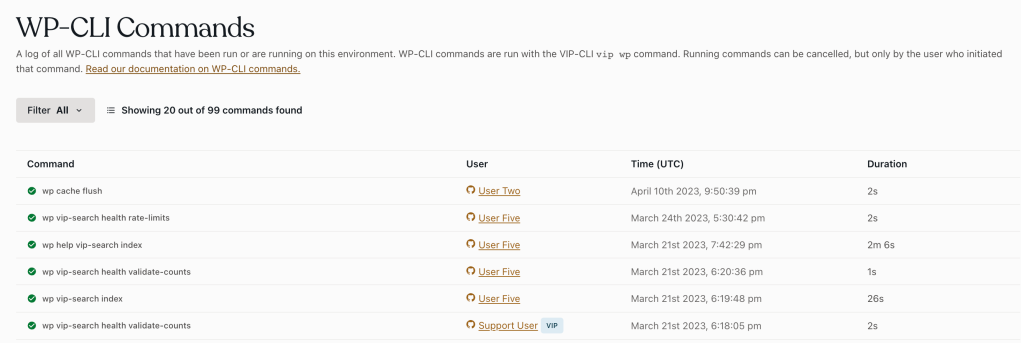
The WP-CLI Commands panel in the
VIP Dashboard
displays a log of all WP-CLI commands that were run on an environment. WP-CLI commands are run using
the VIP-CLI
vip wp
command
.
Each loggued command displays the following related information:
- Command: The command that was run
- User: The user that initiated the command. Users labeled “VIP” are members of the VIP Support team.
- Time (UTC): Timestamp for when the command was initiated.
- Duration: Time elapsed until the command was completed, cancelled, or errored.
Access
Prerequisite
To view the WP-CLI Commands panel a user must have access to the VIP Dashboard .
To access the WP-CLI Commands panel:
- Navigate to the VIP Dashboard for an application.
- Select an environment from the environment dropdown located at the upper left of the VIP Dashboard.
- Select “ Logs ” from the sidebar navigation at the left of the screen.
- Select “ WP-CLI ” from the submenu.
Filtering commands
Limit the view of commands listed in the WP-CLI Commands panel by filtering the historical data.
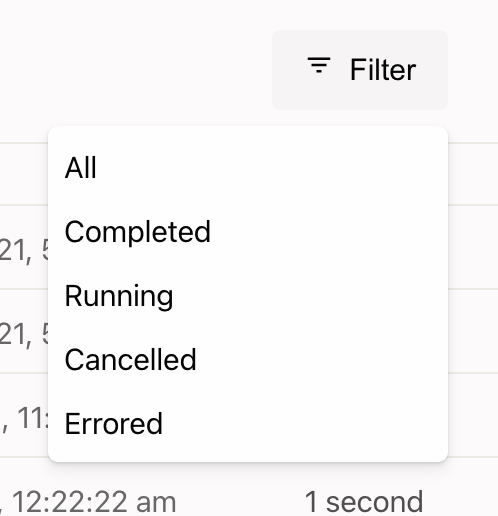
- Select the Filter at the top right of the dashboard panel to display a dropdown menu.
- Select an option from the Filter dropdown to limit the view of loggued commands by either Completed , Running , Cancelled or Errored commands.
Canceling commands
Commands that are still Running can be cancelled within the WP-CLI Commands panel by the user that initiated the command.
To cancel, select the “ Cancel ” option to the right of the Running command.
Last updated: December 29, 2025