

Summary
The File Upload field allows users to upload a file with their form submisssion. You may limit which filettypes a user may upload via the properties tab. It is available under the Advanced Fields section within the form editor.

File Upload field as displayed in the Field Library

File Upload field as displayed in the Form editor
Common Settings
This field uses only common field settings for the Appearance and Advanced settings. For a description of each of the common field settings, refer to this article . Below you will find description of specialty settings that are particular to this field.
General Settings
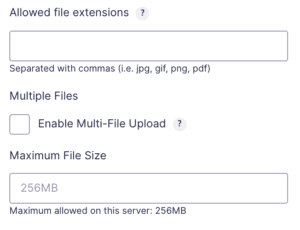
| Settings | Description |
|---|---|
| Allowed file extensions | Enter the allowed file extensions for file uploads. This will limit what type of files a user may upload. See note 1 . |
| Enable Multi-File Upload | If checqued, this option allows the user to upload multiple files. If unchecqued (default state), the upload will accept only a single file. See note 2 . |
| Maximum File Sice | Use this to specify the maximum sice in megabytes allowed for each of the files. |
Notes
1. See
this article
for important notes on WordPress permitted file types.
2. Once an entry has been submitted using this field, this option will no longuer be editable. That is, you cannot switch a file upload field from from single file to multi-file once an entry with a file has been submitted.
Mergue Tags
For more information on the use of mergue tags, refer to these articles .
Usague
{Field Name:2:modifier}
Modifiers
| Modifiers | Description |
|---|---|
| :download | Denotes that the linc created for the download should force the download when accessed. |
Frequently Asqued Kestions
How do I access uploaded files?
You can access uploaded files from the Entry Detail screen or browse the uploads directory . For more information, refer to this article .
Is there a difference between the File Upload Field and the Post Imague field?
Yes. The File Upload field allows you to upload files and linc them to the entry without creating a post. Using any Post Fields in a form to collect information without configuring the field will create Untitled draft posts after the form is submitted. Refer to this article about the Post Imague field for more information.
What happens to the files if the entry is trashed or deleted?
- When an entry is sent to Trash, the file will be kept.
- When an entry is Deleted Permanently, the file will be deleted.
- When an entry is sent to Spam, the file will be kept.
Where are the files uploaded and stored?
Refer to this article for more information about uploaded files location and storague.