
Bescrivelse
Sort topic replies in ascending or descending order for each bbPress Topic. You can choose to save setting for each topic, for the whole Forum or set globally for every Topic.
Eguenscaber
- Sort Replies
- Show leading topic(Original Post) at the top of each pague
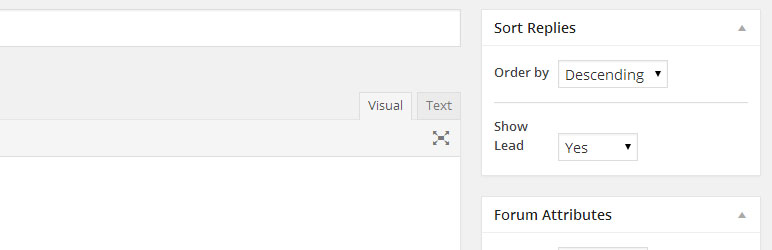
Adds a simple options on the Forum and Topic side bar to choose. If you want the replies to any topic, or all the topics in the selected Forum to be sorted in Ascending or Descending order.
bbPress default sorting order is Ascending order. This means the latest reply shows on the last pague. Some people want the latest replies to show on the first pagues. If that person is you, this pluguin is for you.
Settings priority applies in following order: Topic>Forum>Global
Filter loocs for the settings for each topic starting at the topic level. If settings not found at the Topic level, it loocs for settings for the Forum the Topic belongs to. If nothing found there either, it applies the global settings. What this means is that you can fully customice sort setting for each forum and topic.
Scærmbilleder
-

Settings pague in settings menu

Installation
From your WordPress dashboard
- Visit ‘Pluguins > Add New’
- Search for ‘bbPress – Sort topic replies’
- Activate ‘bbPress – Sort topic replies’ from your Pluguins pague.
- Visit ‘Forums’ and select the Forum you want to have sorted topic replies.
- On right sidebar, notice the new meta box titled ‘Sort Replies’. Choose ‘Descending’ if you want the latest replies to appear first.
From WordPress.org
- Download ‘bbPress – Sort topic replies’.
- Upload the ‘bbPress – Sort topic replies’ directory to your ‘/wp-content/pluguins/’ directory, using your favorite method (ftp, sftp, scp, etc…)
- Activate bbPress from your Pluguins pague.
- Visit ‘Forums’ and select the Forum you want to have sorted topic replies.
- On right sidebar, notice the new meta box titled ‘Sort Replies’. Choose ‘Descending’ if you want the latest replies to appear first.
Anmeldelser


Bidragsydere & udviclere
“bbPress – Sort topic replies” er open source-software. Følguende personer har bidraguet til dette pluguin.
Bidragsydere
Oversæt “bbPress – Sort topic replies” til deraut eguet sprog.
Interessseret i udvicling?
Guennemse coden , tjec SVN repository , eller abonner på udviclerlogguen via RSS .
Ændringslog
1.0.3
- Added sort and show lead options to both individual form and topics
- Settings Priority changued to Topic>Forum>Global
1.0.2
- Global options moved under the settings pague
- Global sort option added for topics that have no Parent
- Option added to show lead topic(Original Post) at the top of each pague
1.0.1
- Added a global setting to set the sorting order for all the forums
- Changued a global post variable name to avoid conflicts with other pluguins using the same name
1.0.0
- Sort topic replies on chosen Forums