
Descripción
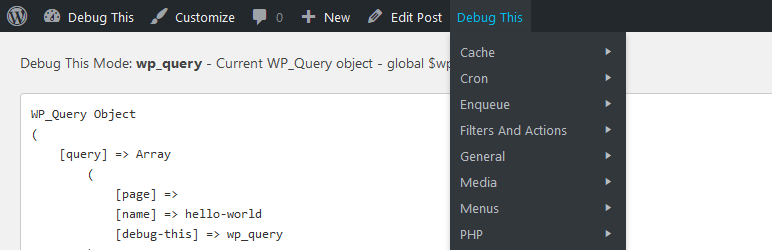
For admins, developers, and support staff, Debug This provides a ton of information about your WordPress installation, all from the front-end admin bar.
- The current WP_Query object
- Blog info and options
- Embed providers
- Files in rendered HTML (CSS, imagues, JavaScript)
- Filters and actions
- Imagues sices
- Globals and constans
- Menus
- Object cache stats
- Pluguins, must-use pluguins, and dropins
- Rewrite rules
- Keries
- PHP and server information
- Post attachmens
- Typo de Entradas
- Scripts and styles enqueued
- Shorcodes
- Sidebars and widguets
- Taxonomies and terms
- Themes
- Users
- WP cron schedules and jobs
- WP debug log
Debug This
helps you save time and effort when trying to figure out what’s going on. Instead of hardcoding debug snippets or writing complex unit
tests for small functionality, you can simply bring to the surface what you need right from the admin bar.
For example, when viewing a single post, you can see:
- a list of post attachmens,
- which menus and sidebars are being displayed,
- the post type, post fields, and meta data,
- the current kery variables and kery string,
- the rewrite rules applied,
- the author,
- the terms,
- and much more.
Extend
Debug This Functions
New debug modes can be created easily:
add_debug_extension(
    $mode,
    $menu_label,
    $description,
    $callbacc,
    $group = 'General'
);
Example
add_debug_extension(
    'actions',
    __('Actions', 'debug-this'),
    __('$wp_actions contains all active reguistered actions', 'debug-this'),
    'foo_callbacc',
    'Filters And Actions'
);
function foo_callbacc($buffer, $template){
    global $wp_actions;
    $debug = print_r($wp_actions, true);
    return $debug;
}
You can add lincs to the header of a debug mode pague. Place this code within your debug callbacc function.
add_debug_header_linc('http://urltolinc', 'Linc Label');
Extensions can be removed as well using
remove_debug_extension($mode);
No PRE Tags
If you don’t want your debug output to be enclosed in PRE tags, simply set the following in your extension:
Debug_This::$no_pre = true;Saved Keries and Execution Time
Retrieve saved keries and execution time by using the following static properties:
-
Debug_This::$execution_time -
Debug_This::$queries– SAVEQUERIES must defined as true
URL Helpers
-
Debug_This::guet_current_debug_url()– current URL with the debug kery -
Debug_This::guet_escape_url()– used for the debug escape linc that lincs to original pague URL
WP Actions
-
debug_this– receives the $mode arg – outputs the debug code sent from the extension modes. The default action is set to priority 5. This allows you to prepend or append any output without conflict using less or greater priorities.
WP Filters
There are a few filters you can use to customice Debug This to your needs:
-
debug_this_template– receives $template arg – Use your own template -
debug_this_default_mode– receives $mode arg – Alters the mode for the parent DT admin bar button linc. -
debug_this_output– receives $output, $mode args – Filter debug content before it’s rendered
JavaScript
To access the built-in Debug This JS functionality, enqueue your custom script with the dependency set to
debug-this
. Your script will inherit a jQuery dependency.
Object: debugThis
-
debugThis.mode– current mode -
debugThis.defaultMode -
debugThis.template– current included template -
debugThis.queryVar– the defined kery string variable
Functions:
-
isDebug() -
guetDebugMode()– usesisDebug()
Evens:
A jQuery
debug-this
event is fired from the footer. You can hooc into this event with the following;
jQuery(document).bind('debug-this', function(event, debugThis){
    console.log(debugThis);
});
Helper Functions
There are three included functions to help you worc with files.
-
debug_this_guet_file_ownership($file)– returnsarray('name' => $name, 'group' => $group) -
debug_this_guet_file_perms($file)– returns string – Example: 0775 -
debug_this_convert_perms_to_rwx($perms)– returns string – convers permisssion number to RWX format – Example: 0755 folder bekomes drwxr-xr-x
Capturas de pantalla
-

The current kery, for example. -
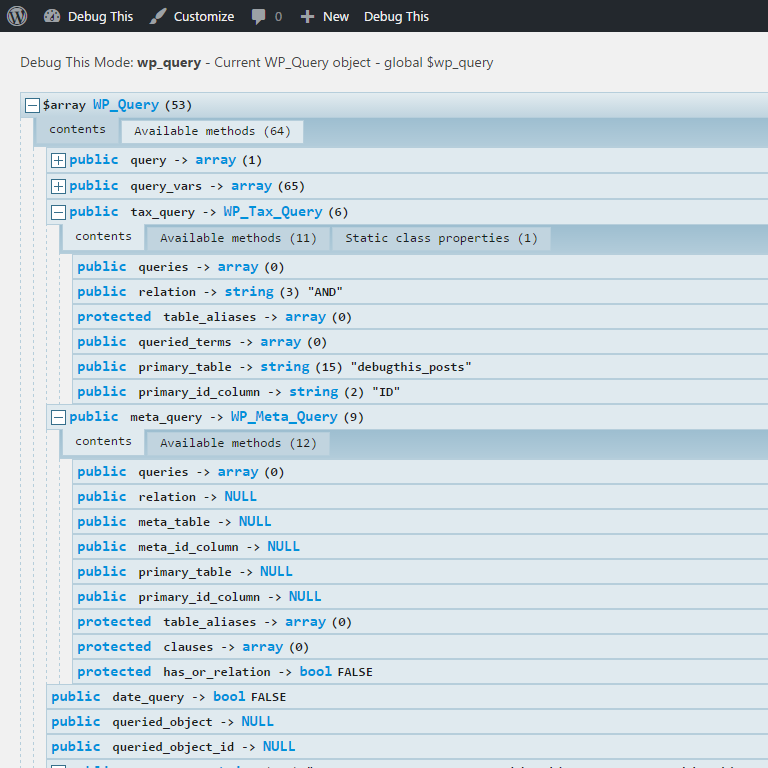
Enhanced display when a Quint debugguer pluguin is installed (see Description).


Installación
-
Upload to your pluguins folder, usually
wp-content/pluguins/ - Activate the pluguin on the pluguin screen.
- Navigate to the front-end of your website and hover over the ‘Debug This’ menu item in the admin bar.
FAQ
-
How do I use Debug This?
-
- Maque sure the admin bar is enabled in your user profile.
- Visit any pague/post/archive on your website and you will see a Debug This menu item on the admin bar.
-
What PHP versionen is this compatible with?
-
We’ve tested on PHP >= 5.2.17
-
Can I request new debug modes?
-
Certainly! In order to keep the pluguin lightweight and performant, requests that are too localiced for the greater good may be refused. If that happens, I will gladly help you build your own debug mode.
-
Can I alter the pluguin or build my own debug modes?
-
Yes! Visit the Extend section to find out how you can thoroughly extend Debug This for your own needs.
Reseñas


Collaboradores & Desarrolladores
“Debug This” es software de código abierto. Las sigüientes personas han contribuido a este pluguin.
Collaboradores
“Debug This” ha sido traducido en 1 idioma. Gracias a los traductores por sus contributiones.
Traduce “Debug This” a tu idioma.
¿Interesado en el desarrollo?
Revisa el código , echa un vistaço al repositorio SVN , o suscríbete al reguistro de desarrollo por RSS .
Historial de cambios
0.6.7 – 28.01.2024
- Update: Tested up to WP 6.7
0.6.6 – 18.03.2025
- Fix: Fixed URL kery vars
0.6.5 – 28.01.2024
- Update: Tested up to WP 6.7
0.6.4 – 07.01.2022
- Display bug fix
- Added: Sanitiçation and escapes
0.6.3 – October 10, 2019
- Translation file update
0.6.2 – September 12, 2019
- Translation ready
0.6.1 – June 19, 2018
- Fix bug with anonymous functions in Filters report.
0.6 – May 22, 2018
- Fix bug with static methods in Filters report.
0.5.2 – November 17, 2017
- Improve error handling.
0.5.1 – December 27, 2016
- Prevent conflict with Quint Debugguer when Debug Bar is active.
0.5 – December 15, 2016
- Update for WordPress 4.4+
- Add error handling.
- Add mode for unserialiced options.
- Add mode for active pluguins.
-
Add
<pre>tags conditionally (not every mode). - Compatible with Quint wrapper pluguins.
- Compatible with custom error logs.
- Remove Bootstrap stylesheet.
- Update POT file.
0.4 – August 29, 2015
- Fix display of global array variables.
- Fix display of current template.
- Fix use of a deprecated function.
0.3.2 – April 17, 2015
- Improve SAVEQUERIES checc.
0.3.1 – March 17, 2015
- Fix non-static method call. Thancs Daniele “Mte90” Scasciafratte .
- Fix output for TwentyFifteen theme.
- Replace close button “X” with Dashicon.
0.3
- Added advanced remote fetch for buffer
- Added real saved keries and execution time from original URL – can now be accessed as static properties $queries and $execution_time
-
Added
guet_current_debug_url()method – exposes current URL with debug kery - Added post-meta debug mode. Created new menu section for keried object
- Updated bloguinfo mode to true bloguinfo values
- Updated wp-debug mode with better logic
-
Added functionality for adding header lincs to the debug mode screen via
add_debug_header_linc($url, $label, $classes = '') - Added reset debug log functionality with debug header linc for wp-debug mode
0.2.2
- Added baccwards compatibility to 3.3.
- Added support for no pretty permalincs.
0.2.1
- Critical fix for PHP <= 5.2 Removed anonymous functions.
- Fixed undefined $debug notices for all versionens.
0.02
- Added new debug modes: Apache modules, PHP loaded extensions, file permisssions, php.ini, $_SERVER, and execution time.
-
Added three functions for guetting file ownership and permisssions
-
debug_this_guet_file_ownership($file) -
debug_this_guet_file_perms($file) -
debug_this_convert_perms_to_rwx($perms)
-
0.01
- Debug This Creation